Building a powerful PC doesn’t require breaking the bank on cooling. Modern budget CPU air coolers deliver performance that rivals many all-in-one liquid coolers at a fraction of the cost. For gamers, content creators, and everyday users alike, a quality air cooler is the most reliable and cost-effective way to keep your processor temperatures in check, ensuring stable performance and a longer component lifespan.
The market is filled with excellent options that prioritize efficient heat dissipation, quiet operation, and broad compatibility with the latest AMD AM5 and Intel LGA 1700/1851 platforms. This roundup cuts through the noise to highlight the best value-oriented air coolers available in 2025, helping you make an informed decision for your next build or upgrade.
Our Top Picks for Budget CPU Air Coolers
- Thermalright Phantom Spirit 120SE CPU Air Cooler
- Thermalright Peerless Assassin 120 SE CPU Cooler
- Noctua NH-U12S Redux, High Performance CPU Cooler
- be quiet! Pure Rock Slim 2 130W TDP CPU Cooler
- ID-COOLING SE-214-XT ARGB CPU Cooler
- Vetroo V5 CPU Air Cooler with 5 Heat Pipes
- ARCTIC Freezer 34 Esports Duo – Tower CPU Cooler
- Gelid Solutions BlackFrore, CPU Cooler
- Jonsbo HX6250 Single Tower Six Heat Pipes CPU Cooler
- Cooler Master Hyper 212 Black Edition CPU Cooler
Thermalright Phantom Spirit 120SE CPU Air Cooler

The Thermalright Phantom Spirit 120SE stands as a top contender for top-tier cooling performance on a budget. It features an impressive seven 6mm heat pipes utilizing AGHP 4.0 technology, which minimizes the effects of gravity on thermal performance regardless of your case orientation. This ensures consistent and reliable heat transfer from your CPU.
This dual-tower cooler is equipped with two 120mm TL-C12B V2 PWM fans that provide a strong airflow while maintaining a reasonable noise profile. With a height of 154mm, it offers wide case compatibility and its design avoids interfering with RAM modules, making installation straightforward on both AMD AM4/AM5 and Intel LGA 1700/1851 platforms.
Thermalright Peerless Assassin 120 SE CPU Cooler

The Thermalright Peerless Assassin 120 SE is a legendary cooler that has set the standard for price-to-performance in the air cooling market. Its six heat pipes with AGHP technology and dual-tower design provide exceptional cooling capacity that can handle high-TDP processors with ease. The anodized aluminum fins offer a large surface area for efficient heat dissipation.
It comes with two 120mm PWM fans that spin up to 1550 RPM, delivering excellent airflow while keeping noise levels low. The cooler’s design is mindful of memory clearance, allowing for standard-height RAM modules to fit without issue. Its broad socket support, including the latest Intel LGA 1851, makes it a highly versatile choice for many builds.
Noctua NH-U12S Redux CPU Cooler
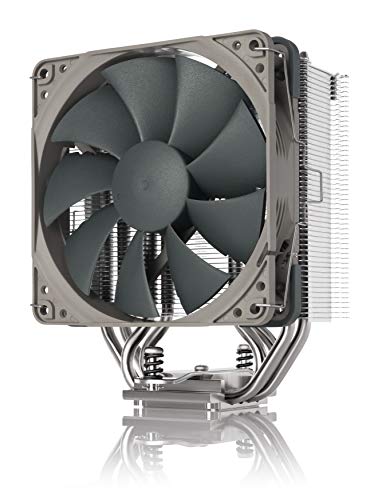
The Noctua NH-U12S Redux brings the renowned quality and performance of the Austrian manufacturer to a more accessible price point. This streamlined single-tower cooler features a slim 120mm design that provides excellent compatibility with a wide range of cases and does not overhang RAM slots or PCIe slots on most motherboards.
It is equipped with a quiet NF-P12 redux-1700 PWM fan that offers automatic speed control. This means you get full cooling performance under heavy processor loads while the fan runs near-silent during idle or low-intensity tasks. Noctua’s SecuFirm2 mounting system ensures a straightforward and secure installation on both Intel and AMD platforms.
be quiet! Pure Rock Slim 2 CPU Cooler

The be quiet! Pure Rock Slim 2 is a compact cooler designed for builds where space is at a premium. Despite its slim profile, it offers a notable 130W TDP cooling efficiency, powered by three 6mm heat pipes using direct-touch technology. This makes it a capable cooler for mid-range CPUs without occupying excessive space inside your case.
Its optimized mounting system, especially for AMD platforms, ensures an even and secure installation. The included Pure Wings 2 92mm PWM fan is engineered for silent operation, producing a maximum of just 25.4 dB(A) while providing sufficient airflow to keep your processor cool under load.
ID-COOLING SE-214-XT ARGB CPU Cooler

For builders looking to add a splash of color to their system without sacrificing performance, the ID-COOLING SE-214-XT is an excellent choice. This cooler combines four heat pipes for efficient heat transfer with a 120mm PWM fan that ensures consistent cooling performance. The direct-contact base maximizes thermal conductivity from the CPU.
The standout feature is its addressable RGB lighting, which can be synchronized with your motherboard via a 5V 3-pin connector. This allows you to match the cooler’s lighting with the rest of your components for a cohesive aesthetic. It provides a great balance of visual appeal and functional cooling for budget-conscious builds.
Vetroo V5 CPU Air Cooler

The Vetroo V5 is a popular all-in-one solution that offers strong cooling performance and vibrant lighting at an accessible price point. It features five direct-touch heat pipes that work in conjunction with a high-density aluminum fin stack to pull heat away from the CPU efficiently. The larger copper base ensures optimal contact with the processor’s heat spreader.
Its 120mm addressable RGB fan can be controlled via a 4-pin PWM connector for dynamic speed adjustment between 800-1700 RPM, allowing for a quiet operation or maximum airflow as needed. The lighting syncs with your motherboard through a 5V 3-pin port, letting you customize the look to match your build’s theme.
ARCTIC Freezer 34 Esports Duo

The ARCTIC Freezer 34 Esports Duo employs a push-pull fan configuration with two BioniX P-Series 120mm PWM fans to provide exceptional cooling performance. This setup moves a large volume of air through the heatsink’s 54 cooling fins, resulting in improved heat dissipation that can handle high-end processors effectively.
Its direct-touch heat pipes are strategically placed to target the processor die directly, even on larger core-count CPUs. The cooler is fully compatible with Intel’s LGA 1700 platform and comes in a distinctive white finish that stands out in builds with a light-themed aesthetic. It represents a solid mid-range option for users who need reliable cooling for demanding applications.
Gelid Solutions BlackFrore CPU Cooler

The Gelid Solutions BlackFrore is a compact cooler designed for small form factor builds or systems with lower thermal requirements. Its two heat pipes utilize direct contact technology to ensure efficient thermal transfer from the CPU. With support for TDP up to 65W, it is a perfect solution for entry-level gaming PCs or office computers.
Featuring a high-class black electrophoretic coating, this cooler not only looks premium but also benefits from improved durability. The 92mm smart PWM fan provides efficient airflow distribution over the heatsink while maintaining silent operation. Its lightweight and compact design ensures broad compatibility and straightforward installation.
Jonsbo HX6250 Single Tower CPU Cooler

The Jonsbo HX6250 is a substantial single-tower cooler that packs six heat pipes into its design, providing ample cooling potential for powerful processors. This configuration allows for efficient heat distribution across a large aluminum fin array, maximizing surface area for effective dissipation.
While specific details are limited, the six-heat-pipe design indicates a focus on high thermal performance. Jonsbo products are generally known for their clean aesthetics and solid build quality, making this cooler an interesting option for users seeking an alternative to the more common brands in the market.
Cooler Master Hyper 212 Black Edition CPU Cooler
The Cooler Master Hyper 212 Black Edition is a modern iteration of the legendary Hyper 212, a cooler that has been a staple in PC building for years. This version features a sleek all-black design that appeals to builders looking for a stealthy aesthetic. Its four direct-contact heat pipes provide efficient thermal transfer from the CPU.
The cooler uses a 120mm PWM fan that balances airflow and noise, making it suitable for a wide range of systems. While the market has evolved with more competitive options, the Hyper 212 Black Edition remains a reliable and proven choice for cooling mid-range processors, with a reputation for consistent performance and easy installation.
Buying Guide: How to Choose a Great Budget CPU Air Cooler in 2025
When you’re building or upgrading a PC on a budget, the CPU cooler is one component where you can save a good chunk of change without sacrificing performance. The stock coolers that come with some processors are often just adequate, and a good budget air cooler can be a massive upgrade. I always look at a few key things to make sure I’m getting the best value for my money.
First, you need to think about compatibility. This is the most critical step. Check the cooler’s specifications to confirm it supports your CPU’s socket, whether it’s an AMD AM5 or an Intel LGA 1700. Also, and this is a common mistake, you must check the physical dimensions. A large, dual-tower cooler might offer amazing performance, but it can easily bump into your RAM modules or even be too tall for your PC case. I always measure the clearance in my case and check the RAM height limits before buying.
Next, consider the thermal design power (TDP) rating. This number, measured in watts, gives you a rough idea of the heat a cooler can handle. You want a cooler with a TDP rating that meets or, better yet, exceeds your CPU’s TDP. This gives you some headroom for those moments when your CPU is working hard, keeping temperatures and noise levels lower. For most budget builds aiming to cool a mid-range CPU, a cooler rated for 150W to 200W is a great target.
The fan itself is another big factor. You’ll see a mix of 120mm and 140mm fans on budget coolers. Generally, a larger 140mm fan can move the same amount of air as a smaller fan but at lower RPMs, which means it will often be quieter. I also pay attention to the bearing type; rifle bearings and fluid dynamic bearings (FDB) are known for their longevity and quiet operation compared to cheaper sleeve bearings.
Finally, don’t forget about the noise. The acoustic performance is measured in decibels (dBA). A cooler that stays below 30 dBA under load is generally considered very quiet. While performance is king, a loud cooler can get annoying fast, especially if your PC is on your desk. Reading reviews that include noise level testing is a habit I’ve found incredibly helpful.
By focusing on these areas—compatibility, TDP, fan size, and noise—you can confidently pick one of the many excellent budget CPU air coolers in 2025 that offer great performance without spending a fortune. It’s one of the most cost-effective upgrades you can make for a smoother, quieter computing experience.
Frequently Asked Questions
Is a budget air cooler better than a stock cooler?
In almost every case, yes. While stock coolers are designed to prevent your CPU from overheating, they often run loud and allow for higher temperatures. A good budget air cooler is built with a larger heatsink and a better-quality fan. This means it can dissipate heat much more effectively, resulting in significantly lower CPU temperatures and a much quieter system, even under load. It’s one of the first upgrades I recommend for anyone using a stock cooler.
Can a budget air cooler handle overclocking?
This depends on the extent of your overclocking and your specific CPU. Many modern budget air coolers are surprisingly capable and can handle a mild to moderate overclock on mid-range processors. However, for pushing a high-core-count CPU to its absolute limits, you would likely need a high-end dual-tower cooler or a liquid cooling solution. For the average user wanting a little extra performance, a solid budget cooler is often perfectly sufficient.
How difficult is it to install an air cooler?
Installation is generally straightforward, but it can vary between models. Most coolers come with a detailed instruction manual and the necessary mounting hardware for different sockets. The main challenge is often ensuring you have enough space inside your case to maneuver. It usually involves attaching a backplate to the motherboard, securing mounting brackets, applying thermal paste, and then fixing the cooler itself. Taking your time and following the steps carefully is key.
Do I need to buy thermal paste separately?
Most budget CPU air coolers come with a small tube or a pre-applied patch of thermal paste, which is perfectly fine for general use. You only really need to buy a separate, high-quality thermal paste if you are planning to remove and reinstall the cooler later, as you will need to clean and reapply it, or if you are chasing the absolute best possible thermal performance for extreme overclocking.
What is the typical lifespan of a budget air cooler?
The heatsink itself, being a piece of metal, can last virtually forever. The moving part—the fan—is what will eventually wear out. A good quality fan on a reputable budget air cooler can easily last for 5 to 7 years or more before you might notice an increase in noise or a failure. Many manufacturers offer warranties that reflect this expected lifespan, giving you peace of mind with your purchase. When you are looking at the 10 best budget CPU air coolers in 2025 that offer great performance, you are typically looking at products built to last.