Finding a capable desktop computer no longer requires a massive tower and an equally large budget. Mini PCs have evolved into powerhouses that can handle everything from office work and media streaming to light gaming and creative projects, all while occupying a fraction of the space. Their compact design, energy efficiency, and surprising performance make them an incredibly smart choice for modern users.
Whether you’re setting up a sleek home office, a discreet home theater PC (HTPC), or a digital signage solution, there’s a budget-friendly mini PC perfect for the task. This roundup cuts through the noise to bring you the top contenders for 2025, balancing processing power, memory, storage, and connectivity to help you find your ideal compact computing solution without overspending.
Our Top Picks for Budget Mini PCs
- Mini PC EliteMini HM90 AMD Ryzen 9 4900H
- Intel NUC11PAHi5 Mini PC, Four-Core i5 1135G7
- Beelink Mini PC, AMD Ryzen 7 5825U, 16GB DDR4
- Intel NUC 13 Pro NUC13ANHi5 Arena Canyon Mini PC
- GEEKOM Air12 Lite Mini PC, Intel 12th Gen
- Beelink U59 Mini PC with 11th Gen Processor N5095
- MINISFORUM Venus Series UM560 XT Mini PC AMD
- FIREBAT Mini PC N150 Intel, 16GB RAM 512GB SSD
- Beelink SER5 MAX Mini PC, AMD Ryzen 7 5800H
- Beelink SER5 Mini PC AMD Ryzen 5 5560U
Mini PC EliteMini HM90 AMD Ryzen 9 4900H
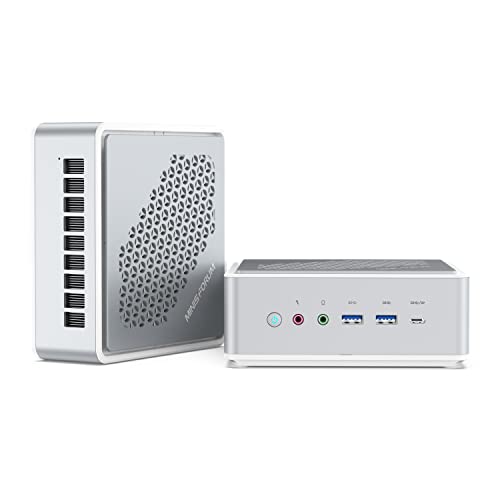
The EliteMini HM90 stands out for users who need serious multitasking power on a budget. With an 8-core AMD Ryzen 9 4900H processor and a generous 32GB of RAM, this mini desktop can comfortably handle demanding applications, heavy browser tabs, and complex spreadsheets without slowing down. Its 512GB PCIe SSD ensures fast boot times and quick application loading.
Flexibility is a key advantage, thanks to dual 2.5-inch HDD slots for massive storage expansion. Connectivity is comprehensive, featuring dual LAN ports for network redundancy, multiple USB 3.0 and 3.1 ports, and versatile video outputs including HDMI, DisplayPort, and USB-C, supporting multiple monitor setups for an enhanced workflow.
Intel NUC11PAHi5 Mini PC

This Intel NUC model is the definition of a compact and efficient computing solution. Its incredibly small footprint allows it to be tucked away almost anywhere, making it ideal for minimalist workspaces, digital signage, or as a portable desktop. The 11th Gen Intel Core i5-1135G7 processor provides a solid balance of performance and power efficiency for everyday tasks.
As a barebone kit, it offers the flexibility to choose your own RAM and storage, letting you tailor the system to your exact needs and budget. It also includes modern features like WiFi 6, Bluetooth 5.2, and a Thunderbolt 3 port, which supports lightning-fast data transfer and 8K video output for future-proof connectivity.
Beelink SER5 Pro Mini PC

The Beelink SER5 Pro is a performance-oriented mini PC that punches well above its weight class. Driven by the AMD Ryzen 7 5825U processor with 8 cores and 16 threads, it delivers exceptional speed for productivity, content creation, and even some gaming. The improved thermal design ensures the system maintains high performance during sustained workloads.
It supports a triple 4K display setup through its DisplayPort, HDMI, and USB-C video ports, making it a fantastic choice for financial analysts, programmers, or anyone who benefits from extensive screen real estate. With 16GB of fast DDR4 RAM and a 500GB NVMe SSD that can be upgraded, it offers a great out-of-the-box experience with room to grow.
Intel NUC 13 Pro Arena Canyon Mini PC

For those seeking modern Intel performance and reliability, the NUC 13 Pro is a compelling option. It’s built around the Core i5-1340P processor, which combines efficient cores with performance cores to intelligently handle a mix of background and demanding tasks. This makes it exceptionally responsive for business and home office use.
It comes with Windows 11 Pro pre-installed and features the latest connectivity standards, including WiFi 6E and Thunderbolt 4. With support for 8K and 4K quad-display output, it can drive a complex multi-monitor setup, providing a seamless and highly productive computing environment right out of the box.
GEEKOM Air12 Lite Mini PC
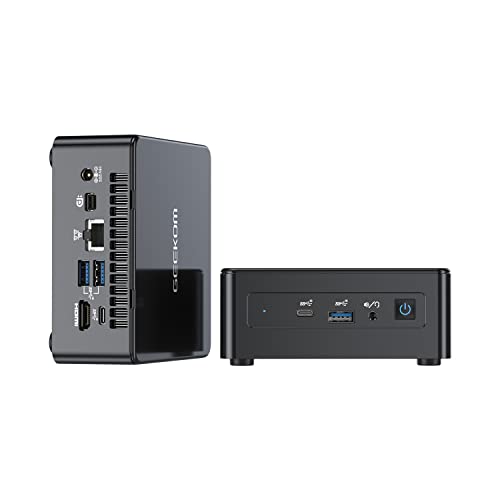
The GEEKOM Air12 Lite is an excellent entry-point into the world of mini PCs, offering a balanced specification for everyday computing. Its Intel 12th Gen processor provides enough power for web browsing, document editing, and streaming 4K content smoothly. The small and lightweight design makes it easy to mount behind a monitor or carry between locations.
It includes 16GB of RAM and a 512GB NVMe SSD, which is a significant amount of storage for a budget system. The option to expand storage further with an additional 2.5-inch drive gives you the flexibility to store a large media library or project files locally.
Beelink U59 Mini PC

The Beelink U59 is a solid and affordable workhorse for basic computing needs. Equipped with an Intel Celeron N5095 processor, it efficiently handles tasks like word processing, email, and video conferencing. With 16GB of RAM and a 512GB SSD, it offers a responsive experience that far surpasses many older traditional desktops in this price range.
Its dual HDMI 2.0 ports allow you to set up a dual-monitor workstation, boosting productivity for office or study use. Features like dual-band WiFi and a Gigabit Ethernet port provide reliable networking options, whether you are connected wirelessly or via a cable.
MINISFORUM Venus Series UM560 XT

The MINISFORUM UM560 XT offers an impressive combination of a 6-core AMD Ryzen 5 processor and a substantial 32GB of RAM at an accessible price point. This hardware configuration is well-suited for users who frequently multitask with numerous applications or work with moderately large datasets.
A standout feature is its triple 4K display capability, enabled by dual HDMI ports and a USB-C video output. This, combined with a 2.5G LAN port for high-speed networking, makes it a versatile hub for a powerful and connected desktop setup. The inclusion of a 512GB PCIe SSD and an open 2.5-inch SATA slot offers excellent storage flexibility from day one.
FIREBAT N150 Mini PC

The FIREBAT N150 is an ultra-budget champion, featuring an efficient Intel N150 processor that is capable for light daily tasks. It’s an ideal machine for web browsing, checking social media, streaming music and video, and running basic office software, all while consuming very little power.
Despite its low cost, it doesn’t skimp on memory or storage, coming with 16GB of RAM and a 512GB M.2 SSD. The ability to add a 2.5-inch drive means you can inexpensively expand its storage capacity to several terabytes, making it a great compact file server or media center for a secondary room.
Beelink SER5 MAX Mini PC

The Beelink SER5 MAX is tailored for users who need strong performance and ample storage without a high price tag. Its AMD Ryzen 7 5800H processor is a proven performer that handles productivity and creative applications with ease. The inclusion of a large 1TB NVMe SSD is a significant benefit, providing plenty of fast storage for applications, games, and files right from the start.
It supports a triple display output via two HDMI ports and a USB-C port, allowing for a highly productive multi-monitor environment. With a comprehensive set of ports and upgradeable memory and storage, the SER5 MAX offers great long-term value and versatility.
Beelink SER5 Mini PC AMD Ryzen 5 5560U
This model from Beelink’s popular SER5 series provides a fantastic balance of performance and efficiency. The AMD Ryzen 5 5560U processor offers 6 cores and 12 threads, delivering smooth performance for general productivity, multimedia consumption, and light gaming. It’s a reliable choice for students, home users, and office workers.
Like its siblings, it is expected to support multiple displays and come with a sensible configuration of RAM and SSD, ensuring a snappy and responsive user experience. Beelink’s reputation for building quality mini PCs at competitive prices makes this a safe and smart choice for anyone entering the compact computing space.
Buying Guide: How to Choose the Best Budget Mini PC in 2025
So, you’re thinking about getting one of the best budget mini PCs in 2025. It’s a smart move. These little boxes have gotten incredibly powerful, often rivaling traditional desktops without hogging your entire desk. But with so many options, how do you pick the right one for you? I’ve spent a lot of time with these machines, and here’s what I focus on.
First up, the processor (CPU). This is the brain of the operation. For basic tasks like web browsing, email, and streaming videos, a modern Intel Celeron or AMD Athlon chip is perfectly fine. If you plan on doing more—like light photo editing, having dozens of browser tabs open, or even some casual gaming—you’ll want to step up to an Intel Core i3/i5 or an AMD Ryzen 3/5. The integrated graphics on these chips, especially AMD’s Vega and Radeon graphics, are surprisingly capable for non-gamers.
Next, let’s talk memory and storage. I consider 8GB of RAM the absolute minimum for a smooth Windows 11 experience in 2025. If you can find a model with 16GB, even better; it gives you a lot more headroom for multitasking. For storage, Solid State Drives (SSDs) are non-negotiable. They make the entire system feel snappy and fast. A 256GB SSD is a good starting point, but 512GB is the sweet spot if you plan on storing a lot of files locally.
Ports and connectivity are super important on a tiny machine. Check for a good selection of USB ports, including the faster USB-C. If you have multiple monitors, look for a mini PC with at least two video outputs, like HDMI and DisplayPort. For wireless, make sure it has the latest Wi-Fi 6 or Wi-Fi 6E and Bluetooth 5.2 for the best performance with your peripherals.
Finally, think about the operating system. Many budget mini PCs come with a licensed version of Windows 11 Pro, which is convenient. Some might come with a Linux distribution or even no OS at all, which is great if you’re a tinkerer but a hassle if you’re not. Also, peek at user reviews about noise levels and thermals. A quiet fan is a blessing for a PC that sits on your desk.
FAQ
What can I realistically use a budget mini PC for?
You’d be surprised how versatile these little machines are. I use mine as a daily driver for web browsing, office work, and streaming 4K video to my TV—it handles all that without breaking a sweat. They are perfect as a home media center, a compact workstation for a home office, or even a low-cost digital signage player. For the right person, picking one of the 10 best budget mini PCs in 2025 can effectively replace a bulky traditional desktop.
Are mini PCs powerful enough for gaming?
This is a common question. Most budget mini PCs are not built for hardcore gaming. They use integrated graphics, which are fine for older titles, indie games, or cloud gaming services like Xbox Game Pass. If gaming is a priority, you’ll need to look at more specialized (and expensive) models with dedicated graphics, which falls outside the typical budget category.
How much should I expect to spend on a good budget model?
The sweet spot for a capable budget mini PC in 2025 is generally between $300 and $500. In this range, you can expect a modern processor (like an Intel Core i5 or AMD Ryzen 5), 8GB to 16GB of RAM, and a 256GB or 512GB SSD. Spending less than that might mean compromises in performance or storage that could frustrate you later.
Can I upgrade the RAM and storage in a mini PC?
It depends entirely on the model, so you have to check the specifications before buying. Many mini PCs have user-upgradeable SODIMM RAM slots and an M.2 slot for an SSD, which is fantastic for future-proofing. However, some of the absolute smallest and cheapest models have the RAM soldered directly to the motherboard, making it impossible to upgrade. Always double-check this if you think you might want to add more memory down the line.
Do they come with all the necessary cables and accessories?
Typically, yes. You should expect the mini PC itself, a power adapter, and sometimes a VESA mount plate in the box. What they often don’t include are an HDMI cable, a keyboard, or a mouse. You’ll probably need to supply those separately, so factor that into your total cost if you don’t already have them lying around.