Building or upgrading a small form factor PC, an office workstation, or a home theater system often presents a unique challenge: finding a graphics card that delivers solid performance without requiring a separate power connector. These low-power GPUs draw all their energy directly from the PCIe slot, making them perfect for systems with limited power supply capacity or space constraints. They offer a simple plug-and-play solution for enhancing visual performance beyond basic integrated graphics.
Whether you’re a casual gamer looking to enjoy older titles, a content creator needing extra display outputs, or simply someone wanting a smoother desktop experience, a card that doesn’t need external power is an ideal choice. For 2025, the market still offers excellent options from both NVIDIA and AMD that balance efficiency with capability. This roundup highlights the best low-power graphics cards available, helping you find the perfect component to complete your build without a major overhaul.
The Best Low Power Graphics Cards Without External Power
- GIGABYTE GV-N105TOC-4GL Geforce GTX 1050 Ti OC
- ASUS GeForce GTX 1050 Ti 4GB Phoenix Fan Edition
- MSI Gaming Radeon RX 560 4GB GDDR5 Graphics Card
- viewmax Biostar Radeon RX 550 4GB GDDR5 Gaming Edition
- ASUS ROG Strix Radeon RX 460 4GB OC Edition
- MSI Gaming GeForce GT 1030 4GB DDR4 LP OC
- ZOTAC GeForce GT 730 Zone Edition 4GB DDR3
- GIGABYTE GV-N1030D4-2GL GeForce GT 1030 Low Profile
- ASUS GeForce GT 730 2GB GDDR5 Low Profile Graphics Card
- ASUS Phoenix GeForce GTX 1650 OC Edition 4GB GDDR6
GIGABYTE GV-N105TOC-4GL Geforce GTX 1050 Ti OC

This GIGABYTE model stands out as a top performer in the no-external-power category. Its 4GB of GDDR5 memory and boosted clock speed of up to 1442 MHz in OC mode provide a reliable experience for 1080p gaming and multimedia tasks. The card is engineered to run on systems with a 300-watt power supply, making it a versatile upgrade for many pre-built office computers.
The low-profile design, with a compact 167-millimeter length, is a significant advantage for small form factor cases. It also supports up to four simultaneous displays, offering excellent flexibility for productivity setups or multi-monitor entertainment systems. This combination of size, power efficiency, and display support makes it an incredibly practical choice.
ASUS GeForce GTX 1050 Ti 4GB Phoenix Fan Edition

ASUS brings its reputable build quality to the GTX 1050 Ti with the Phoenix Fan Edition. Leveraging NVIDIA’s Pascal architecture, this card delivers improved performance and superior power efficiency. It is capable of running many classic and modern games smoothly at 1080p resolution and 60 frames per second, providing a solid entry-level gaming experience.
With support for a digital max resolution of 7680 x 4320, this card is also well-suited for high-resolution content consumption and creative work. The single-fan cooling solution is designed to effectively manage thermals while maintaining a compact form factor that fits most cases without issue.
MSI Gaming Radeon RX 560 4GB GDDR5 Graphics Card
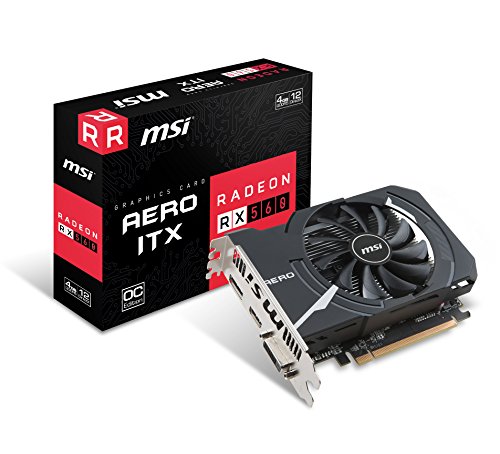
For those who prefer an AMD option, the MSI Radeon RX 560 Aero ITX is a compelling choice. It features 4GB of fast GDDR5 memory on a 128-bit interface, with a memory clock speed of 7000 MHz. This hardware provides enough power for casual gaming and VR-ready applications, all without needing a power connector.
The compact ITX design ensures compatibility with virtually any PC case, from full-tower to mini-ITX builds. MSI’s custom cooler helps keep noise levels down while maintaining stable performance during extended use, making it a reliable component for everyday computing and entertainment.
viewmax Biostar Radeon RX 550 4GB GDDR5 Gaming Edition
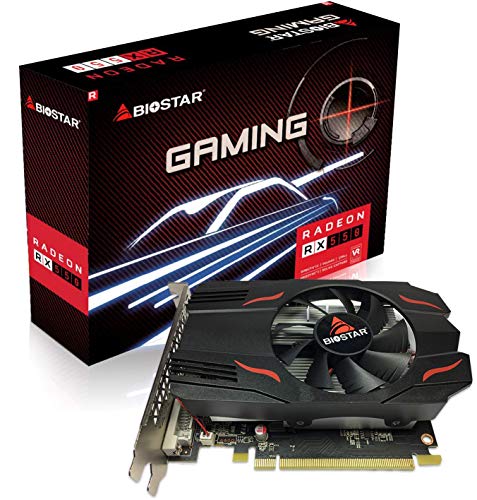
The Biostar Radeon RX 550 is an excellent budget-friendly card for basic gaming and multimedia tasks. With a boost frequency of up to 1183 MHz and 512 processing cores, it handles everyday graphics workloads with ease. Its 4GB of GDDR5 memory and 96 GB/s memory bandwidth are sufficient for modern applications and light gaming.
This card offers strong support for modern rendering formats, including 4K H264 and H265/HEVC decode and encode, making it a good fit for a home theater PC. It is important to note that this newer generation card is best paired with hardware from 2017 or later for optimal compatibility.
ASUS ROG Strix Radeon RX 460 4GB OC Edition

ASUS’s ROG Strix series brings premium features to the low-power RX 460. The card features Aura RGB lighting, allowing for extensive personalization with millions of colors and six different effects. This makes it a great option for users who want to add some visual flair to their build without sacrificing power efficiency.
Beyond its looks, it is equipped with the Direct CU II cooling system, which uses patented wing-blade fans to provide 30% cooler and three times quieter performance. Combined with the user-friendly GPU Tweak II software for monitoring and overclocking, this card offers a feature-rich experience for the enthusiast on a budget.
MSI Gaming GeForce GT 1030 4GB DDR4 LP OC

MSI’s GeForce GT 1030 is a modern and efficient solution for office PCs and HTPCs. With 4GB of DDR4 memory and a boost clock of 1430 MHz, it provides a noticeable improvement over integrated graphics for everyday use. Its low-profile design makes it an ideal candidate for compact systems where space is at a premium.
This card is perfect for users who need a reliable GPU for high-definition video playback, web browsing, and running less demanding applications. The single-fan cooler operates quietly, ensuring that your computing environment remains peaceful.
ZOTAC GeForce GT 730 Zone Edition 4GB DDR3

The ZOTAC GT 730 Zone Edition is a classic budget option that remains relevant for specific use cases. Its 4GB of DDR3 memory and 384 CUDA cores provide a significant performance boost over older integrated graphics solutions. It supports a massive digital resolution of 7680×4320, which is more than enough for high-resolution displays.
This card features a completely passive cooling solution, meaning it produces zero noise during operation. This makes it perfect for home theater PCs where silence is golden. The package includes both full-height and low-profile brackets, offering maximum compatibility for different case designs.
GIGABYTE GV-N1030D4-2GL GeForce GT 1030 Low Profile

GIGABYTE’s version of the GT 1030 is an ultra-compact card, measuring just 150 millimeters in length. Powered by the efficient NVIDIA GeForce GT 1030 GPU and integrated with 2GB of 64-bit DDR4 memory, it is a capable card for HD media playback and basic gaming. Its low power draw makes it one of the most energy-efficient options available.
This card is designed specifically for small form factor systems where every millimeter counts. Despite its tiny size, it delivers a reliable and stable performance that can breathe new life into an older office PC or serve as the heart of a slim media center.
ASUS GeForce GT 730 2GB GDDR5 Low Profile Graphics Card

ASUS offers a silent computing experience with this passively cooled GT 730. The true 0dB operation means the fan produces no noise at all, creating a perfectly quiet environment for home theater and multimedia applications. This is a key benefit for users who prioritize a noise-free experience.
The card is built with Auto-Extreme Technology, an automated manufacturing process that enhances product reliability. It also provides flexible I/O connectivity with DVI-D, VGA (S-Sub), and HDMI 1.4a ports, ensuring compatibility with a wide range of monitors and TVs.
ASUS Phoenix GeForce GTX 1650 OC Edition 4GB GDDR6
Representing one of the more powerful options in this category, the ASUS Phoenix GTX 1650 OC Edition is equipped with modern GDDR6 memory. This provides a substantial performance uplift over older GDDR5 models, making it capable of handling more demanding games and applications at 1080p resolution. Its overclocked out-of-the-box settings offer extra performance without user intervention.
The single-fan Phoenix cooling system is engineered to efficiently dissipate heat from the GPU within a compact design. For users seeking the best possible performance from a card that draws power solely from the PCIe slot, this GTX 1650 model is a top contender that bridges the gap between entry-level and mid-range performance.
Buying Guide: What to Look For in a Low Power Graphics Card Without External Power in 2025
Shopping for a graphics card that runs directly off your motherboard’s PCIe slot is a specific task. You’re likely building a compact, quiet, or legacy system, and getting the right card makes all the difference. I’ve found that focusing on a few key areas will guide you to the perfect choice for your needs.
First and foremost, you need to check your power supply’s capabilities. While these cards don’t need a separate PCIe power cable, they still draw up to 75 watts directly from the slot. If you have a pre-built office PC with a weak 250W or 300W power supply, you must ensure it has enough headroom and, crucially, the correct amperage on the +12V rail. A low-quality power supply might struggle even with this modest demand. Next, consider your physical space. Measure the clearance inside your case, both in length and height. Many low-profile cards are designed for small form factor cases, but you need to confirm they will fit without obstructing other components or the case frame.
Performance expectations are the next big thing. You’re not going to be playing the latest AAA games at 4K with ultra settings on one of these. That’s just the reality. Instead, think about what you actually want to do. Are you looking for a smooth 1080p gaming experience in older or less demanding titles like Valorant or Minecraft? Or is your primary goal to add multi-monitor support for spreadsheets and web browsing? Maybe you just need a modern video decoder to watch 4K movies on a CPU that lacks integrated graphics. Being honest with yourself about performance needs will prevent disappointment.
Finally, pay close attention to the outputs. An older card might only have DVI and HDMI 1.4, which limits your monitor choices and refresh rates. In 2025, I look for cards with at least one DisplayPort 1.4 output, as this gives you the most flexibility for high-resolution and high-refresh-rate monitors. Also, check how many displays the card can support simultaneously if that’s important for your workflow. By balancing these factors—power, size, performance, and connectivity—you can confidently pick one of the best low power graphics cards without external power in 2025 that will breathe new life into your system without requiring a full overhaul.
FAQ
What does “without external power” mean for a graphics card?
It means the graphics card gets all the electricity it needs directly from the PCI Express x16 slot on your motherboard. The PCIe slot can provide up to 75 watts of power. These cards do not require a separate 6-pin or 8-pin power cable from your power supply unit (PSU). This makes them incredibly easy to install and ideal for systems with limited power capacity or messy cables.
Can I really game on a card that doesn’t have its own power connector?
Yes, absolutely, but you have to manage your expectations. You won’t be playing Cyberpunk 2077 with path tracing enabled. However, modern cards in this category, like some from the NVIDIA GeForce GTX 1650 or AMD Radeon RX 6400 line, are perfectly capable of handling esports titles (League of Legends, CS:GO), older AAA games, and many indie titles at 1080p resolution with medium to high settings. They are a massive upgrade over older integrated graphics and are great for a budget-friendly gaming experience.
Are these cards good for video editing or 3D rendering?
For serious, professional-grade work, they are not the best choice. Video editing and 3D rendering are very demanding tasks that benefit greatly from more powerful GPUs with their own dedicated power and much more VRAM. However, for very light editing, such as cutting together home videos or simple projects, they can manage. Their real strength in creative work is as a display adapter in a system where the CPU’s integrated graphics is handling the Quick Sync or similar encoding duties.
Will this graphics card work in my old office computer?
In most cases, yes, and that’s one of their primary uses! They are the go-to solution for upgrading pre-built PCs from manufacturers like Dell or HP. You must check two things first: physical space (you may need a “low-profile” card) and your power supply’s wattage and quality. As long as you have a free PCIe x16 slot and a power supply that isn’t completely anemic, one of the best low power graphics cards without external power in 2025 is a fantastic way to add gaming capability or modern display outputs to an older machine.
Do I need to uninstall my old drivers before installing one of these?
This is a great habit to get into. To avoid potential conflicts, I highly recommend using a tool like DDU (Display Driver Uninstaller) to completely remove your existing graphics drivers from Windows before you physically install the new card. This is especially important if you are switching from an AMD to an NVIDIA card, or vice-versa. After the new card is installed, you can then download and install the latest drivers from the manufacturer’s website.
What is the biggest advantage of these types of graphics cards?
The biggest advantage is their simplicity and compatibility. Because they don’t need extra power cables, the installation is as simple as plugging the card into the slot. This eliminates cable management issues and makes them compatible with a huge range of systems that have weak or non-modular power supplies. They are the ultimate plug-and-play component for giving a system a quick and easy graphics boost without any of the complications that come with more powerful hardware.