A clean and organized PC build isn’t just about aesthetics; it’s a cornerstone of optimal performance and airflow. Messy cables can obstruct critical air pathways, leading to higher temperatures and reduced efficiency for your valuable components. For any builder, from first-timers to seasoned enthusiasts, a case designed with cable management in mind is a non-negotiable starting point for a successful project.
The market offers a vast array of cases, but finding one that truly simplifies the cable routing process can be a challenge. This roundup focuses on chassis that provide the necessary features—wide channels, Velcro straps, and ample hidden space—to make achieving that pristine, professional look not just possible, but straightforward. We’ve curated a list of the best cases across all sizes to help you find the perfect foundation for your next build.
Our Top Picks for PC Cases with Superior Cable Management
- NZXT H7 Elite – Premium Mid-Tower PC Gaming Case
- NZXT H5 Flow Compact ATX Mid-Tower PC Gaming Case
- Cooler Master Cosmos C700M E-ATX Full-Tower
- MSI MPG Series GUNGNIR 100, Premium Mid-Tower PC Gaming Case
- MUSETEX 6 RGB LED Dual Fans 2 Translucent Tempered Glass Panel
- Phanteks Enthoo Evolv ITX Tempered Glass Metal Exterior
- Lian Li TU-150WX Tu 150-WX Black Aluminum Mini-ITX Computer Case
- LIAN LI Mid-Tower Chassis ATX Computer Case PC Gaming Case
- MasterBox Pro 5 RGB (MCY-B5P2-KWGN-01)
- Fractal Design Meshify 2 Compact TG Light Tinted Tempered Glass
NZXT H7 Elite – Premium Mid-Tower PC Gaming Case

The NZXT H7 Elite is a premium mid-tower that combines sophisticated aesthetics with a builder-friendly design. It features an opened-up top panel with a perforated design to achieve superior thermal efficiency, allowing warm air to flow out more effectively. For cooling, it supports large radiators up to 360mm in both the front and top, and comes with three pre-installed RGB fans for impressive lighting right out of the box.
Where this case truly excels for builders is its thoughtful cable management system. NZXT has engineered wider cable channels that provide significantly more room to route and hide cables neatly. The addition of dedicated cable hooks adds stability, ensuring your carefully managed cables stay in place even during moves or upgrades. This focus on a clean interior makes the building process smoother and results in a showcase-worthy finished product.
NZXT H5 Flow Compact ATX Mid-Tower PC Gaming Case

The NZXT H5 Flow is a compact ATX case built around the principle of high-performance airflow. Its perforated front and top panels are designed to direct a steady stream of filtered air across your components, keeping temperatures low and performance high. A unique feature is the dedicated 120mm fan positioned at an angle to draw cool air from below the case, providing direct and targeted cooling for your graphics card.
This case offers spacious cooling support for its size, accommodating up to a 280mm radiator in the front and a 240mm up top. It comes with two pre-installed 120mm fans to get you started. The cable management system is designed to be straightforward and effective, helping you achieve a clean build that not only looks good but also promotes the excellent airflow the case is known for.
Cooler Master Cosmos C700M E-ATX Full-Tower

The Cooler Master Cosmos C700M is a statement-making full-tower chassis designed for builders who demand maximum flexibility and premium features. It boasts a highly versatile interior layout that can be configured to suit nearly any build, from complex custom water-cooling loops to multi-GPU setups. A notable inclusion is the graphics card riser cable, which allows for vertical GPU mounting to showcase your hardware.
With its expansive size, the C700M provides an immense amount of space behind the motherboard tray for routing and concealing cables. This makes managing even the most complex set of power and data cables a manageable task, ensuring the main chamber remains clutter-free for optimal airflow and a clean aesthetic. It’s a case built for ambitious projects where organization is paramount.
MSI MPG Series GUNGNIR 100, Premium Mid-Tower PC Gaming Case
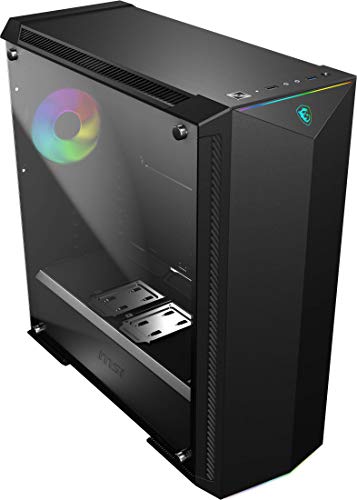
The MSI MPG GUNGNIR 100 is a feature-rich mid-tower that emphasizes customization and cooling potential. It comes equipped with a total of four fans, including one ARGB fan and a 1-to-8 ARGB LED hub, giving you extensive control over your system’s lighting without needing extra controllers. The 4mm thick tempered glass side panel offers a clear view of your components and lighting effects.
A unique aspect of this case is its support for 3D printed parts, allowing you to customize the top and bottom of the front panel for a truly personalized look. From a cable management perspective, the case includes a built-in hub that helps reduce cable clutter from multiple RGB fans, contributing to a cleaner and more organized build process and final appearance.
MUSETEX 6 RGB LED Dual Fans 2 Translucent Tempered Glass Panel

The MUSETEX case stands out with its impressive array of six pre-installed 120mm ARGB fans, which provide strong airflow and vibrant lighting right from the start. These fans feature illumination on both the inner and outer rings, creating a more pronounced lighting effect than standard single-ring fans. You can control the lighting through a button on the case with 19 modes or sync it with a compatible 5V motherboard.
Internally, the case offers a spacious layout that supports ATX motherboards, large GPUs up to 380mm, and various water-cooling radiator sizes. The dual full-view tempered glass panels put your build on display, making clean cable management essential. The case provides a practical layout with removable hard disk holders to free up space and facilitate a tidier cable arrangement for a polished final look.
Phanteks Enthoo Evolv ITX Tempered Glass Metal Exterior

The Phanteks Enthoo Evolv ITX is a compact case that doesn’t compromise on build quality or organization. It features a robust metal exterior and a clean interior design that effectively hides the PSU and hard drives. The tempered glass panels allow you to showcase your work, while the easy-access dust filters and fans simplify maintenance.
This case is a standout for cable management in the small form factor category. It comes equipped with Phanteks’ own Velcro cable ties and offers a generous 28mm of space behind the motherboard tray for routing cables. An additional cable compartment provides even more room to stow away excess wiring, ensuring a clean and uncluttered main chamber that is crucial for airflow in a smaller case.
Lian Li TU-150WX Tu 150-WX Black Aluminum Mini-ITX Computer Case

The Lian Li TU-150WX is a premium, portable Mini-ITX case constructed from aluminum. It features a tempered glass side panel to display your compact build and includes convenient front I/O with USB 3.0 and a Type-C port. Its compact footprint makes it ideal for users who need a powerful system in a transportable form factor.
Despite its small size, the TU-150WX is designed with practicality in mind. It includes support for two 2.5″ drives or a combination of one 2.5″ and one 3.5″ drive. The case layout takes into account the challenges of building in a small space, providing sensible routing paths and tie-down points to help you manage cables effectively, which is critical for maintaining good airflow and a clean appearance in a Mini-ITX build.
LIAN LI Mid-Tower Chassis ATX Computer Case PC Gaming Case

The Lian Li LANCOOL 205 is a mid-tower chassis that emphasizes a clean aesthetic and ease of use, making it a great choice for first-time builders. It features a durable SPCC steel construction with plenty of room for standard components. The tempered glass side panel provides a clear view of your system, and it supports ATX, mATX, and Mini-ITX motherboards.
This case is built with an ease-of-installation design philosophy. It includes removable SSD mounting brackets and swappable top and front fan brackets that allow you to configure the layout to your needs. The bottom side panel provides separate access to the PSU and HDD bay, making installation and cable management a more straightforward and less frustrating process. These features collectively help you achieve a neat and organized build.
MasterBox Pro 5 RGB

The Cooler Master MasterBox Pro 5 RGB is a value-oriented mid-tower that includes appealing features right out of the box. It comes with three pre-installed 120mm RGB fans positioned behind the front panel to create a striking diffused lighting effect. For connectivity, it includes a 1-to-3 splitter cable for the RGB LED fans, simplifying the wiring process.
A key benefit of this case is its flexible mounting system for storage drives. You can easily mount and rearrange SSDs across the motherboard tray and on the back side using the included SSD brackets. This flexibility aids in cable management by allowing you to position drives in a way that minimizes cable clutter and creates a cleaner path for routing wires, contributing to a more organized interior.
Fractal Design Meshify 2 Compact TG Light Tinted Tempered Glass
The Fractal Design Meshify 2 Compact is renowned for its excellent airflow, thanks to its high-perforation mesh front panel. The light-tinted tempered glass side panel offers a subtle view of your components while reducing the visibility of minor imperfections inside the case. This model maintains a relatively small footprint while offering full ATX compatibility.
Fractal Design is known for its thoughtful engineering, and the Meshify 2 Compact continues this tradition with a smart internal layout designed for easy building. It features a simplified cable routing system with wide channels and plenty of tie-off points. The case also includes a modular storage system that can be adjusted or removed to free up space and create a cleaner path for cables, making it simpler to achieve a professional-looking build with optimal airflow.
Buying Guide: How to Choose the Best PC Case for Cable Management in 2025
When I build a PC, I know that clean cable management is about more than just looks. A tidy case improves airflow, which keeps your components cooler and can even boost performance. It also makes future upgrades or troubleshooting so much easier. With so many cases on the market, knowing what to look for can save you a lot of frustration. Here’s my guide on the key features to consider when searching for one of the 10 best PC cases for cable management in 2025 (Mini, Mid & Full-tower).
First, think about the case size. Mini-towers are compact but can be tricky to work in, so you need one with clever routing solutions. Mid-towers are the sweet spot for most builders, offering a great balance of space and features. Full-towers are massive and give you the most room to hide cables, but they take up a lot of desk or floor real estate. Your choice here will depend on your motherboard size and how much expansion you plan for.
The most important feature is the cable routing channel behind the motherboard tray. Look for a case where this space is deep, ideally over 25mm. This depth gives you room to tuck away thick power supply cables and fan hubs without forcing the side panel to bulge. Next, check for plenty of velcro straps or rubber grommets on the cable routing holes. Velcro straps are reusable and make adjustments simple, while grommets give the build a clean, finished look and protect cables from sharp metal edges.
Don’t forget about built-in cable management aids. Many modern cases come with a dedicated vertical channel for front-panel audio and USB cables, which keeps them separate from the main power bundle. Some even include velcro tie-down points or a “stealth” PSU shroud that completely hides the power supply and all its associated cables, creating a very clean aesthetic for your main chamber. Also, consider where the case places its drive bays; modular or tool-less designs let you remove cages you don’t need, opening up huge pathways for air and cables.
Finally, pay attention to the little things. A case with pre-installed PSU mounting brackets can simplify the initial installation. Ample clearance between the back panel and the chassis frame is a must. And for me, a case that includes a built-in fan hub or ARGB controller is a huge bonus, as it drastically reduces the number of cables you need to manage from the start. By focusing on these features, you can find a case that makes the building process smooth and the final result something to be proud of.
Frequently Asked Questions
Why is good cable management in a PC case so important?
Good cable management is crucial for two main reasons: thermals and maintenance. When cables are a tangled mess, they block the smooth flow of air from your intake to your exhaust fans. This means hot air gets trapped around your CPU and GPU, leading to higher operating temperatures and potentially louder fan noise as they spin faster to compensate. A clean build also makes it much easier to swap out components, add new storage, or troubleshoot a problem because you can actually see and reach what you need without wrestling with a nest of wires.
How much clearance should I look for behind the motherboard tray?
This is one of the most critical specs for easy cable management. I always recommend looking for a case with at least 25mm to 30mm of clearance behind the motherboard tray. This depth gives you enough space to route the 24-pin motherboard cable, the 8-pin CPU power cable, and various fan and RGB wires without putting excessive pressure on the back panel. If the space is too shallow, you risk pinching cables and you might not be able to close the side panel at all, which is a frustrating way to finish a build.
Are full-tower cases always better for cable management than mid-towers?
Not necessarily. While a full-tower case gives you the most physical space to work with, many modern mid-tower cases are designed with cable management as a top priority. They often feature just as many routing holes, velcro straps, and a deep enough rear channel as their larger counterparts. For the vast majority of builders using a standard ATX motherboard and a couple of storage drives, a well-designed mid-tower will offer more than enough room for a pristine cable job. You only really need a full-tower if you’re planning an extreme custom water-cooling loop or multiple GPUs.
What are PSU shrouds and how do they help?
A PSU shroud is a metal or plastic cover that hides the power supply unit and the bulk of its cables from the main compartment of the case. It’s a fantastic feature for two reasons. First, it creates a much cleaner and more professional-looking build by covering the least attractive part of your components. Second, it acts as a dedicated channel to stuff all your excess cable length. Instead of having to perfectly route and tie down every single cable, you can neatly bundle the extras out of sight under the shroud, which simplifies the process immensely.
Do I need any special tools for managing my cables?
You don’t need anything fancy. The case should provide velcro straps or zip ties, but it’s a good idea to have your own pack of reusable velcro ties on hand for extra flexibility. A magnetic tip screwdriver is incredibly helpful for working in tight spaces. Some builders also use a cable comb to align the individual wires of their modular PSU cables for a super clean look, but this is purely for aesthetics. For most of us, our hands, some velcro, and a little patience are the only real tools required.
Can a good case make me better at cable management?
Absolutely. A case designed with the 10 best PC cases for cable management in 2025 (Mini, Mid & Full-tower) in mind does a lot of the hard work for you. With clear routing paths, plenty of tie-down points, and a logical layout, it guides you toward a clean build. It removes the frustration of fighting against the case itself. While practice and technique still matter, starting with a case that has these features will absolutely result in a better-looking and better-performing system than if you tried to force order into a case that wasn’t built for it.