Expanding your digital workspace with a secondary monitor is one of the most effective ways to boost productivity. Whether you’re coding alongside documentation, managing complex spreadsheets, or simply keeping your email and calendar in view, a dedicated second screen eliminates the constant hassle of tab-switching and window-minimizing. The right secondary display can streamline your workflow, reduce mental fatigue, and help you accomplish more in less time.
With so many options available, from high-resolution panels for creative work to budget-friendly models for everyday tasks, selecting the perfect companion for your primary monitor can be challenging. This roundup for 2025 cuts through the noise to present ten of the best secondary monitors, each evaluated for its ability to enhance your productivity setup. We’ve considered factors like screen real estate, connectivity, ergonomics, and eye comfort to help you find the ideal match for your work style.
Our Recommended Secondary Monitors
- ASUS VG248QG 24″ G-SYNC Gaming Monitor
- ASUS VP229HE 21.5” Monitor, 1080P Full HD, 75Hz
- Sceptre 20″ 1600 x 900 75Hz LED Monitor
- Dell S2721QS Monitor 27 Inch, 4K UHD IPS Display
- ASUS ProArt Display 27″ Monitor PA278CV – WQHD
- LG 27UP850K-W 27-inch Ultrafine 4K UHD IPS Monitor
- SAMSUNG 32″ UJ59 Series 4K UHD Computer Monitor
- HP 27h Full HD Monitor – IPS Panel & 75Hz Refresh
- Acer 23.8” Full HD IPS Zero Frame Home Office Monitor
- Sceptre E248W-19203R 24″ Ultra Thin Monitor
ASUS VG248QG 24″ G-SYNC Gaming Monitor

While marketed as a gaming monitor, the ASUS VG248QG’s high 165Hz refresh rate and ultra-fast 0.5ms response time make it an excellent secondary screen for any task involving motion, such as video editing timeline scrubbing or tracking fast-moving data. The exceptionally smooth cursor movement and window transitions reduce visual strain during rapid multitasking. Its 24-inch Full HD display provides a sharp and responsive workspace for side-by-side application use.
Ergonomics are a key strength for long work sessions. The stand offers full tilt, swivel, pivot, and height adjustment, allowing you to position the monitor in either landscape or portrait mode for optimal comfort. Furthermore, ASUS Eye Care technology incorporates flicker-free backlighting and a blue light filter to minimize eye fatigue, which is crucial when you’re spending hours looking at your secondary display.
ASUS VP229HE 21.5” Monitor

The ASUS VP229HE is a compact and efficient secondary monitor that excels in space-constrained environments. Its 21.5-inch Full HD IPS panel ensures colors remain consistent and accurate even when viewed from sharp angles, which is ideal for a side monitor that isn’t always directly in front of you. The 75Hz refresh rate, supported by Adaptive-Sync technology, provides a noticeably smoother visual experience compared to standard 60Hz displays, reducing screen tearing when scrolling through documents or web pages.
This model places a strong emphasis on viewing comfort. It comes with a comprehensive suite of ASUS Eye Care features, including TÜV Rheinland-certified Flicker-free and Low Blue Light technologies. Unique additions like Color Augmentation for better differentiation between shades and a Rest Reminder function help maintain your eye health during long periods of computer use, making it a thoughtful choice for your desk setup.
Sceptre 20″ 1600 x 900 75Hz LED Monitor

For those seeking a highly affordable and functional secondary monitor, the Sceptre 20-inch display offers solid core features. Its 1600×900 resolution provides adequate screen space for holding reference materials, communication apps, or system monitoring dashboards without dominating your desk. The 75Hz refresh rate is a welcome upgrade over basic 60Hz panels, contributing to smoother on-screen motion and a more responsive feel during everyday use.
This monitor simplifies your setup by including built-in speakers, saving you the need for external audio devices if you use your secondary screen for video calls or occasional media playback. The fast response time helps reduce ghosting and blurring, keeping text and images crisp. With multiple HDMI and VGA inputs, it can easily connect to a variety of laptops and desktop computers.
Dell S2721QS 27 Inch 4K UHD Monitor

If your primary work involves high detail, the Dell S2721QS serves as a phenomenal secondary monitor with its stunning 27-inch 4K UHD display. With four times the resolution of Full HD, this screen offers immense real estate for fitting multiple windows, viewing high-resolution assets, or working with intricate design tools without any pixelation. The IPS panel and ultra-thin bezels on three sides create an immersive and visually seamless experience.
This monitor is built for all-day comfort and versatility. The stand is fully adjustable, allowing for height, tilt, swivel, and pivot adjustments to achieve the perfect viewing angle, whether in landscape or portrait orientation. Support for HDR content playback adds depth and vibrancy to visuals, making it a great choice for creative professionals who need accurate color and clarity in their secondary display.
ASUS ProArt Display PA278CV 27″ Monitor

The ASUS ProArt PA278CV is the definitive secondary monitor for creative professionals and anyone who demands color accuracy. This 27-inch WQHD (2560 x 1440) display is Calman Verified and factory calibrated to an exceptional Delta E < 2 color accuracy, ensuring that the colors you see on your secondary screen are true to life. It covers 100% of both the sRGB and Rec. 709 color spaces, making it ideal for photo and video editing workflows.
Connectivity is a major advantage. It features a USB-C port with 65W Power Delivery, allowing you to connect a modern laptop with a single cable for video, data, and charging. The built-in USB hub and DisplayPort daisy-chaining capability further streamline your cable management. With its extensive adjustments and professional-grade panel, this monitor is a productivity powerhouse for a serious workstation.
LG 27UP850K-W 27-inch Ultrafine 4K UHD Monitor

The LG 27UP850K-W combines high-resolution 4K clarity with versatile connectivity, making it a top-tier companion for modern laptops. Its 4K UHD IPS display is VESA DisplayHDR 400 certified, providing enhanced brightness and contrast for a more dynamic range of colors and details. This makes it excellent for content consumption and creative tasks where visual fidelity is important on your secondary screen.
A standout feature is the USB Type-C port with 90W Power Delivery. This single-cable solution can connect to your laptop, transmit a 4K video signal, and provide ample power to charge the device, drastically reducing desktop clutter. The adjustable stand offers tilt, height, and pivot control, and built-in speakers add to the convenience, creating a clean and highly functional secondary setup.
SAMSUNG 32″ UJ59 Series 4K UHD Monitor

For maximum screen real estate, the Samsung 32-inch UJ59 4K UHD monitor offers a vast canvas for multitasking. Its large size and high resolution allow you to view multiple full-size applications simultaneously without any compromise, effectively replacing the need for two smaller monitors. The VA panel supports a billion shades of color, delivering rich and vivid images that are ideal for detailed analytical work or media review.
Samsung’s UHD upscaling technology is a useful feature, intelligently enhancing the picture quality of lower-resolution SD, HD, and Full HD content to appear sharper on the 4K display. This means that even if you’re viewing a 1080p video on your secondary screen, it will still look clear and detailed. It’s a productivity-focused monitor that prioritizes space and image quality.
HP 27h Full HD Monitor
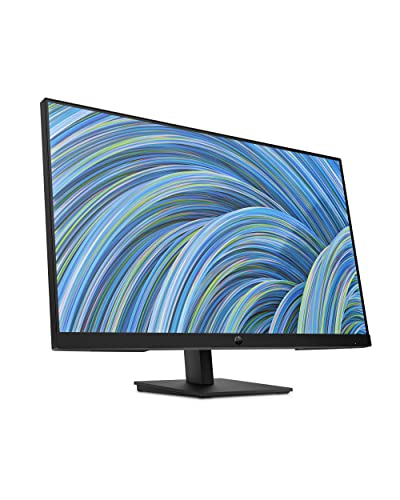
The HP 27h is designed as a reliable and modern secondary monitor for hybrid workers. Its 27-inch Full HD IPS panel with a 75Hz refresh rate provides a smooth and vibrant display for everyday productivity tasks. The three-sided micro-edge bezel offers a nearly borderless view, which is perfect for creating a seamless multi-monitor setup with minimal distraction between screens.
This monitor balances a sleek design with practical functionality. It includes built-in dual speakers for convenient audio and offers 100mm of height adjustment along with tilt capability, allowing you to ergonomically align it with your primary display. The combination of its thin profile, clean aesthetics, and essential features makes it a strong candidate for a professional home or office environment.
Acer 23.8” Full HD IPS Zero Frame Monitor
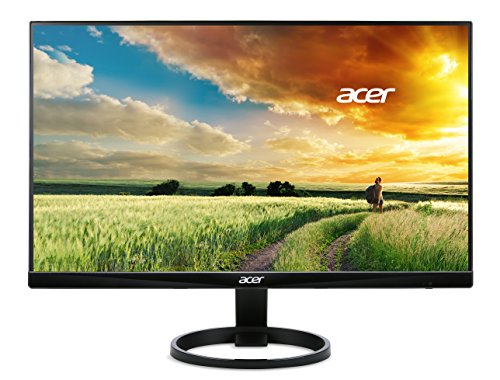
The Acer R240HY is a timeless choice for a no-fuss, reliable secondary monitor. Its 23.8-inch Full HD IPS display delivers consistent color and wide 178-degree viewing angles, ensuring the image looks great from any position. The standout “Zero Frame” design minimizes bezels, making it an excellent option for multi-monitor configurations where you want to reduce the visual break between screens.
This monitor is built for straightforward functionality in home and office settings. It includes features like a low blue light mode to help reduce eye strain during extended use. With versatile connectivity options including HDMI, DVI, and VGA, it can connect to almost any computer system. It represents a solid value, providing essential performance and quality for general productivity.
Sceptre E248W-19203R 24″ Ultra Thin Monitor
The Sceptre E248W-19203R offers a balance of a large 24-inch screen and a slim, space-saving profile, making it a practical secondary monitor. Its Full HD resolution provides a sharp and clear picture for reading text and viewing images. The ultra-thin design helps it fit neatly into any workspace without adding bulk, which is ideal for keeping your desk organized and clutter-free.
This monitor is designed for ease of use and everyday productivity. It is well-suited for holding secondary applications like web browsers, communication tools, or reference documents. While specific features for this model are limited in our listing, Sceptre monitors are generally known for providing reliable performance and essential connectivity at an accessible point, making them a popular choice for expanding your digital workspace.
Buying Guide: How to Choose the Best Secondary Monitor for Productivity in 2025
Choosing the right secondary monitor can feel like a big decision, but I find that breaking it down into a few key features makes it much easier. The goal isn’t always to get the flashiest screen, but the one that genuinely complements your main setup and boosts your workflow. Here’s what I always consider.
First, let’s talk size and orientation. For a secondary screen, I don’t usually go as large as my primary monitor. A 24-inch to 27-inch display is the sweet spot for me. It offers ample real estate without dominating my desk. Crucially, I almost always get a monitor with a pivot stand that allows for portrait mode. Reading long documents, coding, or viewing lengthy web pages in portrait is a complete game-changer for productivity. It feels like I’m finally using my screen space efficiently.
Next is resolution. I aim for at least 1080p (Full HD), but if my budget allows, I step up to 1440p (QHD). The extra sharpness is noticeable, especially for text, which reduces eye strain during long work sessions. Pair that with an IPS panel, which I strongly prefer for its accurate colors and wide viewing angles, and you have a recipe for a comfortable viewing experience. I don’t prioritize high refresh rates for a productivity-focused secondary monitor; 60Hz or 75Hz is perfectly fine for tasks like writing, research, and communication.
Connectivity is another practical point. I make sure the monitor has the right ports to connect to my laptop or desktop without needing a mess of dongles. HDMI and DisplayPort are standard, but a USB-C port with power delivery is a huge bonus. It means I can connect my laptop with a single cable for video, data, and charging, which really cleans up my workspace.
Finally, I look at the physical design. An adjustable stand that offers height, tilt, and swivel adjustment is non-negotiable for me. Being able to perfectly align the secondary monitor with my primary one prevents neck strain. VESA mount compatibility is also a great feature to have, giving me the flexibility to use a monitor arm later if I want. When I look for the 10 best secondary monitors in 2025 for productivity, these are the criteria I use to separate the good from the great, focusing on features that truly make my workday smoother.
Frequently Asked Questions
Is a secondary monitor really worth it for productivity?
Absolutely, in my experience, it’s one of the most impactful upgrades you can make. Having a second screen eliminates the constant juggling of windows and tabs. I can keep my main task, like writing or design, on my primary monitor and have my reference material, email, or communication apps open on the secondary one. This simple change drastically cuts down on the time I waste switching between applications.
What size is best for a secondary monitor?
I find that a 24-inch monitor is the perfect starting point. It’s large enough to be useful without being overwhelming. If you have the desk space, a 27-inch model is also a fantastic choice. For a truly specialized setup, a ultra-wide monitor can act as two virtual screens, but for most people, a standard 24-inch or 27-inch display is the most practical and cost-effective option for a secondary display.
Should my secondary monitor match my primary one?
It’s nice if they match, but it’s not essential. The most important thing for me is that the resolution is somewhat comparable to avoid a jarring difference in sharpness when I move my cursor between them. I don’t worry too much about color accuracy being identical unless I’m doing color-critical work. For general productivity, having two different models from different brands works just fine.
Is a 60Hz refresh rate sufficient for a second monitor?
Yes, for a productivity-focused secondary monitor, 60Hz is completely sufficient. You’re not going to be gaming or watching high-frame-rate video on it (at least, not as your primary activity). The smoothness of a high refresh rate is great for a primary display, but for holding static windows like documents, spreadsheets, and Slack, 60Hz does the job perfectly and keeps the cost down.
What is the benefit of a USB-C monitor?
A USB-C monitor is a huge convenience, especially if you use a modern laptop. With a single cable, you can handle the video signal, connect peripherals like your mouse and keyboard to the monitor’s USB hub, and charge your laptop. It massively reduces cable clutter on my desk and makes connecting and disconnecting my laptop a one-step process. It’s a feature I now look for in any new monitor.
Can I use a portable monitor as a secondary screen?
You certainly can, and I’ve done it myself when I need a flexible setup. Portable monitors are thin, light, and often powered by USB-C, making them incredibly easy to set up. They are fantastic for adding a third screen on the go or for a minimalist desk. However, their size is typically smaller (around 15-17 inches), and they often lack the robust, adjustable stands of traditional monitors, so it’s a trade-off between flexibility and permanence. When considering the 10 best secondary monitors in 2025 for productivity, a portable model could be a great choice if your priority is mobility.