Creating a stunning white PC build requires careful attention to every component, and the CPU cooler is a centerpiece that marries performance with aesthetics. A white cooler can tie your entire color scheme together, transforming a collection of parts into a cohesive and visually striking system. Whether you’re aiming for a minimalist, Arctic-inspired look or a vibrant RGB showcase, the right cooler is essential.
This roundup covers a range of options, from high-performance all-in-one liquid coolers to efficient and quiet air coolers. We’ve selected models that not only deliver excellent thermal performance for your processor but also enhance the clean, bright aesthetic of a white-themed build. You’ll find choices for various budgets and performance needs, ensuring your computer stays cool while looking its absolute best.
The Best White CPU Coolers for Your Build
- Lian Li GALAHAD AIO 360 RGB UNI FAN SL120
- NZXT Kraken Z73 RGB White – Liquid Cooler with LCD
- NZXT Kraken X53 RGB 240mm AIO RGB CPU Liquid Cooler
- Corsair iCUE H150i Elite Capellix Liquid CPU Cooler
- ASUS ROG Strix LC 360 White Edition All-in-one Cooler
- ARCTIC Freezer 34 Esports Duo – Tower CPU Cooler
- be quiet! Shadow Rock 3 White 190W TDP CPU Cooler
- ID-COOLING SE-224-XT White CPU Cooler 4 Heatpipes
- ARCTIC Freezer A13 X – Compact AMD CPU Cooler
- Deepcool AK620 WH High-Performance CPU Cooler
Lian Li GALAHAD AIO 360 RGB UNI FAN SL120

For builders seeking a perfect blend of high-performance cooling and integrated aesthetics, the Lian Li GALAHAD AIO 360 is a top contender. It comes equipped with three pre-installed SL120 UNI FANs, which are renowned for their seamless RGB lighting and excellent airflow. This creates a unified look right out of the box, eliminating the need for separate fan purchases.
The cooler features a machine-detailed aluminum housing on the pump head, adding a touch of premium craftsmanship to your build. With comprehensive support for the latest Intel LGA 1700 and AMD AM5 sockets, it ensures broad compatibility. The 360mm radiator provides a large surface area for dissipating heat, making it suitable for overclocking high-end CPUs.
NZXT Kraken Z73 RGB White
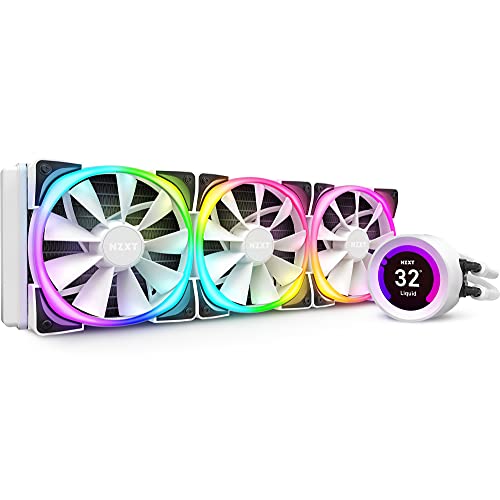
The NZXT Kraken Z73 takes customization to the next level with its integrated 2.36-inch LCD screen. This display can showcase system vitals like CPU temperature and coolant temperature, or you can upload custom images and GIFs to truly personalize your battlestation. It serves as a dynamic centerpiece that is both functional and visually engaging.
Performance is handled by NZXT’s efficient pump design and Aer P radiator fans, which use fluid dynamic bearings for silent operation and long-term reliability. The entire ecosystem is managed through NZXT’s intuitive CAM software, giving you precise control over cooling performance and RGB lighting effects from a single interface.
NZXT Kraken X53 RGB 240mm

Offering a more accessible entry into NZXT’s liquid cooling lineup, the Kraken X53 still delivers impressive style and performance. Its key feature is a larger, rotating infinity mirror ring on the pump head. This allows you to adjust the orientation of the NZXT logo during installation without affecting the mounting, ensuring a clean look in any case.
The cooler is equipped with two Aer RGB V2 fans that feature a chamfered intake to maximize airflow and static pressure. The fluid dynamic bearing contributes to a quiet operation even under load. Like its bigger sibling, it is fully controlled by CAM software, allowing for synchronized RGB lighting across compatible devices.
Corsair iCUE H150i Elite Capellix

Corsair’s iCUE H150i Elite Capellix is a powerhouse designed for users who want maximum cooling performance and deep integration into the Corsair ecosystem. The pump head is lit by 33 ultra-bright CAPELLIX LEDs, offering vibrant and customizable lighting. It includes a Commander CORE controller, which simplifies the management of up to six RGB fan speeds and lighting.
This 360mm AIO comes with three ML RGB Magnetic Levitation fans. These fans are known for their high airflow and low noise, using magnetic levitation technology for durability and quiet operation. With support for the latest Intel and AMD sockets, it provides a future-proof cooling solution for high-TDP processors.
ASUS ROG Strix LC 360 White Edition
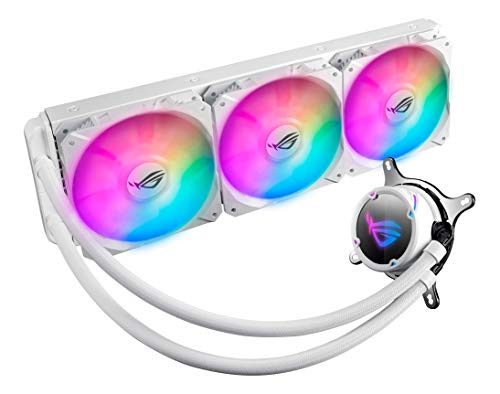
Embodying the ROG design philosophy, this all-in-one cooler combines potent cooling with sleek aesthetics. The pump cover features an NCVM coating for a premium, mirror-like finish and is adorned with individually addressable RGB lighting that syncs seamlessly with other Aura Sync compatible components. It’s an ideal choice for a dedicated ROG-themed build.
The radiator is populated by three ROG-designed fans that are optimized for a balance of high static pressure and airflow, ensuring efficient heat dissipation from the 360mm radiator. Its design is intended to complement ROG motherboards, making it the centerpiece of a cohesive and high-performance gaming setup.
ARCTIC Freezer 34 Esports Duo

If you prefer the reliability of air cooling, the ARCTIC Freezer 34 Esports Duo offers exceptional value and performance. Its signature grey and white color scheme fits perfectly into a themed build. The cooler utilizes a push-pull configuration with two BioniX P-Series fans, one 120mm and one 92mm, which work together to move air more efficiently through the dense fin stack.
With four direct-touch heat pipes and an optimized heatsink featuring 54 cooling fins, it provides excellent heat dissipation for its class. It is fully compatible with Intel’s LGA1700 socket and is designed to target the CPU die directly for efficient heat transfer, making it a capable cooler for gaming and productivity tasks.
be quiet! Shadow Rock 3 White

Staying true to its brand name, the Shadow Rock 3 White is engineered for powerful and near-silent operation. It boasts a 190W TDP rating, handled by five 6mm nickel-plated copper heat pipes with HDT (Heat-Pipe Direct Touch) technology. The brushed aluminum top plate adds a touch of understated elegance.
A key feature is its asymmetrical design, which ensures full clearance for your RAM modules, even those with tall heat spreaders. It uses a single, decoupled Shadow Wings 2 120mm PWM high-speed fan that produces a mere 24.4 dB(A) at maximum speed, making it an excellent choice for quiet PC builds that don’t compromise on cooling.
ID-COOLING SE-224-XT White

The ID-COOLING SE-224-XT is a budget-friendly air cooler that doesn’t sacrifice style or performance. It features four direct-touch heat pipes that make direct contact with the CPU IHS for efficient heat transfer. The all-white finish and clean design allow it to integrate seamlessly into a color-coordinated build without a high cost.
It is equipped with a 120mm PWM fan that automatically adjusts its speed based on temperature, providing a good balance of cooling performance and quiet operation. Its compact design ensures it does not interfere with RAM installation, a valuable trait even on smaller mini-ITX motherboards.
ARCTIC Freezer A13 X

Designed specifically for AMD’s AM5 and AM4 platforms, the ARCTIC Freezer A13 X is a compact and efficient single-tower cooler. Its low profile of 137mm makes it suitable for smaller cases where larger coolers might not fit. Despite its size, it packs three direct-touch heat pipes and 44 aluminum fins for effective heat dissipation.
This cooler is notable for its energy efficiency, consuming 65% less power than its predecessor while remaining whisper-quiet. It comes with pre-applied MX-2 thermal paste for a straightforward installation process, making it a practical and hassle-free choice for an AMD-based white build.
Deepcool AK620 WH High-Performance CPU Cooler
The Deepcool AK620 WH is a formidable dual-tower air cooler designed to compete with many liquid cooling solutions. Its massive fin stack is paired with two 120mm PWM fans that work in tandem to provide exceptional airflow and static pressure. The all-white aesthetic, including the fans and top cover, makes it a visually impressive component.
This cooler is built to handle high thermal loads, making it suitable for powerful, overclocked CPUs. The design also prioritizes compatibility, ensuring that it does not obstruct memory slots despite its large size. For builders who want top-tier air cooling performance and a clean white finish, the AK620 WH is a compelling option.
Buying Guide: How to Choose a White CPU Cooler
So, you are putting together a white PC build and you have hit the part where you need to pick a CPU cooler. It is not just about finding something that looks good, though that is a big part of it. You also need something that can handle the heat your processor puts out. Let me walk you through the main things I consider when I am picking out one of the best white CPU coolers for a build.
First, you need to decide between an air cooler and an All-in-One (AIO) liquid cooler. Air coolers are my go-to for simplicity and reliability. They are essentially a big hunk of metal with fins and a fan. There are no pumps to fail or liquid to leak, and they often last for years with minimal maintenance. They can be massive, though, so you must check your case’s clearance for both height and width. AIO coolers use a radiator and fans to dissipate heat. They often offer slightly better cooling performance, especially for overclocked high-end CPUs, and they can give your build a cleaner, more open look since you are not blocking the view with a giant heatsink. The trade-off is more potential points of failure with the pump and a generally higher price.
Next, think about compatibility. This is non-negotiable. You must ensure the cooler is built for your CPU’s socket. Most modern coolers support popular sockets like AMD’s AM4/AM5 and Intel’s LGA 1700, but always double-check the product specifications. Also, remember to measure your case! A massive tower air cooler is useless if your case side panel will not close. For AIOs, you need to confirm where the radiator will mount—front, top, or side—and that your case has the required space and mounting points for the radiator size you want (e.g., 240mm, 280mm, 360mm).
Performance, or Thermal Design Power (TDP), is how we measure a cooler’s ability to manage heat. You want a cooler with a TDP rating that meets or, better yet, exceeds the TDP of your CPU. If you have a power-hungry chip or you plan on overclocking, you should lean towards a high-performance dual-tower air cooler or a 280mm/360mm AIO. For most mid-range and budget CPUs, a single-tower air cooler or a 120mm/240mm AIO is more than enough.
Finally, do not forget about aesthetics and noise. Since you are building a white-themed PC, the look is a priority. Many coolers offer options with white fans, white shrouds, or even completely white radiator housings. RGB lighting is also common, allowing you to sync colors with the rest of your system. Noise is a personal preference. Larger fans typically spin slower to move the same amount of air, resulting in a quieter system. Look for reviews that mention noise levels (measured in dBA) if a silent operation is important to you. Picking the right component is key to completing your vision for the 10 best white CPU coolers for your white PC build.
Frequently Asked Questions
Are white CPU coolers less effective than black ones?
This is a common myth, and the answer is no. The color of the cooler’s finish has a negligible impact on its performance. The cooling capability comes from the design of the heatsink (the density and surface area of the fins), the fan’s airflow and static pressure, and the contact with the CPU. A well-designed white cooler will perform identically to the same model in black. The paint or coating used is typically very thin and does not act as an insulator.
Do I need to use thermal paste with a new white CPU cooler?
Most coolers come with thermal paste pre-applied on the base plate in a convenient square or X pattern. This is perfectly fine to use for your initial installation. However, if you ever remove the cooler and need to re-install it, you must completely clean off the old paste from both the cooler and the CPU and apply a fresh, pea-sized amount of new thermal paste. I always keep a small tube of quality paste on hand for situations like this.
Can I replace the fans on my AIO liquid cooler with white ones?
Yes, you absolutely can! As long as the new fans are the correct size (e.g., 120mm or 140mm) and have a compatible connector (usually a standard 4-pin PWM), you can swap them out. This is a great way to customize the look of an AIO that might have a white radiator but black fans, or to upgrade to fans that are quieter or have better performance. Just make sure the new fans have good static pressure, as this is important for pushing air through a radiator’s dense fins.
Is a liquid cooler always better than an air cooler for a white build?
Not always. While high-end liquid coolers can offer top-tier cooling, a high-quality dual-tower air cooler can often match or even outperform a mid-range 240mm AIO. The choice really depends on your specific CPU, your case’s airflow, and your aesthetic goals. An air cooler offers proven reliability, while an AIO can provide a specific clean or “high-tech” look. For many people, a good air cooler is more than sufficient and often represents a better value.
How important is RAM clearance with a white air cooler?
Extremely important. Many large white air coolers have wide heatsinks that can overhang the RAM slots on your motherboard. Before you buy, you need to check the cooler’s specifications for its maximum RAM height clearance and then compare that to the height of your RAM modules, especially if you have fancy RGB heat spreaders. Some coolers address this by having a raised design on the front fan or by allowing you to shift the fan higher up on the heatsink. Planning your selection from a list of the 10 best white CPU coolers for your white PC build should always include a quick check of your component dimensions.
My white cooler has RGB lighting, but it is not syncing with my motherboard. What should I do?
First, check the connection. RGB fans usually have two cables: one for power (to the motherboard’s fan header or a hub) and one for lighting (to a 3-pin 5V ARGB header or a 4-pin 12V RGB header on your motherboard). Ensure the RGB cable is securely connected to the correct header. If the connection is good, you will need to use the software that controls your motherboard’s lighting, such as ASUS Aura Sync, MSI Mystic Light, or Gigabyte RGB Fusion. Sometimes you may need to install specific software provided by the cooler manufacturer to enable full synchronization.