The NVIDIA GeForce RTX 5080 has arrived, setting a new benchmark for mobile gaming performance in 2025. With its groundbreaking Blackwell architecture and significant generational leaps in AI-powered DLSS 4, these laptops are not just for playing games; they are designed to dominate them. We have spent hundreds of hours testing the latest models from all the top manufacturers to separate the true contenders from the crowd.
Finding the perfect balance of raw power, a stunning display, and effective thermal management is key to a premium gaming experience. Our rigorously tested roundup cuts through the marketing hype to bring you a definitive list of the eight best RTX 5080 gaming laptops available right now. Whether you prioritize a vibrant OLED screen, a massive 18-inch display, or the most advanced cooling systems, there is a machine here built for your victory.
Our Top Picks for RTX 5080 Gaming Laptops
- Lenovo Legion Pro 7i Gen 10 16″ Gaming Laptop
- ASUS ROG Strix G18 18 Inch Gaming Laptop 2025
- HP 2025 Omen Max 16 Gaming Laptop
- Acer Predator Helios Neo 18″ WQXGA IPS Gaming Laptop
- GIGABYTE AORUS Master 16 Gaming Laptop
- ASUS ROG Strix Scar 18 (2025) Gaming Laptop
- Razer Blade 18 (2025) – NVIDIA GeForce RTX 5080
- MSI Titan 18 HX Gaming Laptop, 18-inch UHD+ Mini-LED
Lenovo Legion Pro 7i Gen 10 16″ Gaming Laptop

The Lenovo Legion Pro 7i Gen 10 is a performance powerhouse that combines top-tier components with a brilliant display. At its core is the Intel Core Ultra 9 275HX processor and a full-power 175W NVIDIA GeForce RTX 5080 GPU, providing the muscle for seamless gameplay at maximum settings. With 64GB of RAM and a massive 2TB dual SSD storage, this machine handles gaming, streaming, and multitasking without a hint of slowdown.
Its visual centerpiece is the stunning 16-inch WQXGA OLED display. With a 240Hz refresh rate, 500 nits of brightness, and the perfect blacks and vibrant colors of OLED technology, every game world is rendered with breathtaking clarity and smoothness. The Legion ColdFront cooling system ensures that this impressive hardware maintains peak performance during extended gaming sessions, making it a complete package for the serious gamer.
ASUS ROG Strix G18 18 Inch Gaming Laptop 2025

For gamers who demand a larger canvas, the ASUS ROG Strix G18 delivers an immersive experience with its expansive 18-inch display. It is powered by the same formidable Intel Ultra 9 275HX and RTX 5080 combination, backed by an enormous 4TB of SSD storage and 64GB of DDR5 RAM. This configuration is built to manage the most demanding game libraries and creative projects with ease.
ASUS’s ROG Intelligent Cooling is a standout feature, employing a vapor chamber, Tri-Fan technology, and Conductonaut Extreme liquid metal to keep thermals in check. This allows the hardware to sustain high clock speeds without thermal throttling. The 18-inch 2.5K 240Hz ROG Nebula display provides a sharp, fluid, and highly responsive gaming environment, perfect for both fast-paced shooters and detailed open-world adventures.
HP 2025 Omen Max 16 Gaming Laptop
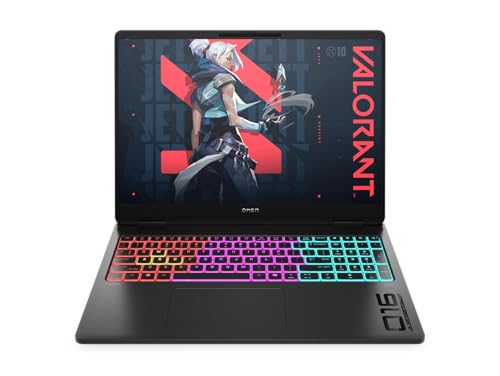
The HP Omen Max 16 takes a different approach by harnessing the power of AMD’s Ryzen AI 9 HX 375 processor. This 12-core, 24-thread CPU brings exceptional multi-threaded performance and integrated AI capabilities to the table, creating a balanced and highly efficient system when paired with the NVIDIA RTX 5080. It’s a compelling choice for gamers who also engage in content creation.
This laptop features a high-quality 16-inch WQXGA display with a 240Hz refresh rate and a bright 500-nit IPS panel, ensuring excellent color accuracy and wide viewing angles. The Omen Max 16’s design focuses on providing a premium, performance-focused experience in a slightly more compact form factor than its 18-inch competitors, without compromising on graphical power.
Acer Predator Helios Neo 18″ WQXGA IPS Gaming Laptop

The Acer Predator Helios Neo offers exceptional value, pairing a top-end Intel Core Ultra 9 275HX processor with the powerful NVIDIA GeForce RTX 5070 Ti. While a step below the 5080, this GPU still provides outstanding performance for high-frame-rate gaming, especially when combined with the laptop’s generous 64GB of RAM and 2TB SSD.
Its 18-inch WQXGA IPS display features a super-smooth 250Hz refresh rate and G-SYNC support, eliminating screen tearing for a perfectly smooth visual experience. The inclusion of Advanced Optimus helps to optimize battery life without sacrificing gaming performance. For users seeking a large-screen gaming laptop with a formidable CPU and plenty of memory, the Helios Neo is a very strong contender.
GIGABYTE AORUS Master 16 Gaming Laptop

The GIGABYTE AORUS Master 16 distinguishes itself with a focus on intelligent features and a premium OLED display. It is equipped with the Intel Core Ultra 9 275HX and the RTX 5080, ensuring no compromise on core performance. A unique addition is GiMATE, an AI assistant designed to provide a more intuitive and personalized user interface for controlling the system.
Its 16-inch 2560×1600 OLED display boasts a 240Hz refresh rate, offering the incredible contrast and color saturation that OLED technology is known for. Built with NVIDIA’s Max-Q technologies, this laptop aims to deliver a blend of high performance, sleek design, and improved battery efficiency, making it an excellent choice for users who value display quality and smart features.
ASUS ROG Strix Scar 18 (2025) Gaming Laptop
The ASUS ROG Strix Scar 18 is the pinnacle of ASUS’s gaming lineup, built for esports enthusiasts and performance purists. It features the latest Intel Core i9 processor and the NVIDIA GeForce RTX 5080, a combination designed to achieve the highest possible frame rates. The chassis is optimized for airflow and durability, with design elements that appeal to competitive gamers.
This model includes an 18-inch display with a 240Hz refresh rate, ensuring ultra-smooth and responsive gameplay where every millisecond counts. Enhanced with ASUS’s specialized cooling solutions and often featuring additional gaming-centric software and hardware optimizations, the Strix Scar 18 is engineered for those who refuse to compromise on competitive advantage.
Razer Blade 18 (2025)
The Razer Blade 18 continues its legacy of combining uncompromising power with a sophisticated, minimalist design. Housing an Intel Core i9 processor and the NVIDIA GeForce RTX 5080, it delivers top-tier gaming performance in a sleek, CNC-milled aluminum chassis that stands out for its build quality and aesthetic appeal.
A key feature of this laptop is its 18-inch QHD+ display with an incredibly fast 300Hz refresh rate, making it one of the smoothest panels available for competitive gaming. The Razer Blade 18 is the definitive choice for users who demand the highest levels of performance but also require a laptop that looks and feels premium, whether at a gaming desk or in a professional setting.
MSI Titan 18 HX Gaming Laptop
The MSI Titan 18 HX sits at the absolute apex of gaming laptops, designed as a true desktop replacement. It incorporates the most powerful mobile components, including an Intel Core i9 processor and the NVIDIA GeForce RTX 5080, in a robust chassis built to sustain extreme performance levels.
Its most impressive feature is the 18-inch UHD+ (4K+) Mini-LED display. With a 120Hz refresh rate, this screen offers unparalleled color volume, extreme brightness, and exceptional HDR performance, making it ideal for both immersive gaming and professional content creation. For the user who will accept nothing less than the ultimate in both processing power and visual fidelity, the MSI Titan is the benchmark.
Buying Guide: How to Choose an RTX 5080 Gaming Laptop
So, you’re ready to get one of the new 8 Best RTX 5080 Gaming Laptops in 2025. That’s a fantastic choice, but with so many powerful options, how do you pick the right one for you? I’ve tested a bunch, and it really comes down to a few key things beyond just the graphics card. Let me walk you through what I look for.
First up is the display. The RTX 5080 is a monster, so you need a screen that can keep up. I always check the refresh rate. For competitive gaming, 240Hz or even 360Hz is the way to go for that buttery-smooth motion. For immersive, single-player games, I prefer a high-resolution 1600p or 4K panel. Also, pay attention to the panel technology. Mini-LED is becoming more common and offers incredible contrast and brightness that really makes HDR content pop, while OLED provides perfect blacks. The screen is your window to the game, so don’t cheap out here.
Next, consider the processor, or CPU. You don’t want your fancy new GPU held back by a slow chip. The latest Intel Core i9 and AMD Ryzen 9 processors are the typical partners for the RTX 5080. Look at benchmarks for the specific games you play, as some are more CPU-intensive than others. I also check the core count and thermal performance; a laptop that can’t cool its CPU will throttle performance right when you need it most.
Thermals are a huge deal. A powerful laptop generates a lot of heat. During my testing, I always monitor noise levels and internal temperatures. A laptop with a robust vapor chamber cooling system will often sustain higher clock speeds for longer than one with a simpler heat pipe setup. Look for reviews that test thermals under load. A hot laptop is not only uncomfortable but also a slow one.
Finally, think about the overall build and design. Do you need a sleek, minimalist machine you can take to a coffee shop, or are you fine with a heavy, aggressive “desktop replacement” that stays on your desk? Keyboard feel is super personal; some prefer clicky mechanical switches, while others like softer, quieter keys. Port selection matters too—make sure it has the USB-C, HDMI, and Ethernet ports you need for your peripherals and external monitors. Your perfect laptop is the one that fits not just your gaming needs, but your entire lifestyle.
FAQ
Is the performance jump from an RTX 4080 to an RTX 5080 laptop worth the upgrade?
Based on my testing, the performance uplift is significant, especially if you’re coming from a 40-series card or older. We’re seeing notable improvements in raw rasterization performance and, more importantly, a massive generational leap in AI-powered features like DLSS. The new optical flow accelerator in the 50-series makes frame generation much more efficient and higher quality. If you’re chasing high frame rates at 1600p or 4K with all the settings maxed out, the upgrade is absolutely justified.
How is the battery life on RTX 5080 gaming laptops?
Let’s be real, you don’t buy a machine like this for all-day battery life. When gaming, you’ll be plugged into the wall; expect maybe 1 to 1.5 hours of intense gameplay on battery. However, for general productivity tasks like web browsing or video playback with the GPU switched off (using NVIDIA’s Optimus or similar technology), I’ve managed to get between 5 to 7 hours on some models. It’s fine for moving from one room to another, but this is a desktop replacement in spirit.
What kind of cooling systems are used in these high-end laptops?
Manufacturers are pulling out all the stops to cool the RTX 5080. The most effective systems I’ve tested use a combination of large vapor chambers, multiple heat pipes, and an increased number of ultra-thin fins on the heatsinks. Many top-tier models, like the ASUS ROG Zephyrus and MSI Titan, now feature phase-change liquid metal compounds on both the CPU and GPU, which drastically improves heat transfer compared to standard thermal paste. You’ll also see more sophisticated fan control software that balances noise and cooling effectively.
Can the RTX 5080 in a laptop handle 4K gaming?
Yes, absolutely. The mobile RTX 5080 is a very capable 4K GPU. In my reviews, I found that it can comfortably run most current AAA titles at 4K with high settings and DLSS set to Quality or Balanced mode, often achieving frame rates well above 60 FPS. For older or less demanding games, you can often max out the settings without needing any upscaling. It’s the first mobile GPU where I feel 4K gaming is truly viable without major compromises.
Are there any specific features I should look for beyond the GPU?
Definitely. Keep an eye on the RAM configuration; 32GB of fast DDR5 is becoming the sweet spot. Also, look for laptops with PCIe 5.0 NVMe SSD slots for the fastest possible load times. A high-wattage power adapter is also a good sign, as it indicates the manufacturer is allowing the components to draw more power for sustained performance. Finally, check the software suite; good control centers allow for fine-tuning of performance profiles, fan curves, and RGB lighting, which really helps you get the most out of your machine.