For digital artists, architects, and designers, a laptop is more than a productivity tool; it’s a digital canvas. The precision and responsiveness of the stylus can make or break a creative workflow, turning a complex illustration into a fluid masterpiece or a frustrating struggle. In 2025, the technology has reached new heights, with displays offering unparalleled color accuracy and pens that feel as natural as traditional media.
This roundup focuses on laptops that excel in stylus performance, catering to professionals who demand the best. We have evaluated devices based on their display quality, pressure sensitivity, and overall design to help you find the perfect partner for your creative projects. Whether you are sketching, photo editing, or 3D modeling, these machines are built to keep up with your imagination.
Our Recommended Laptops for Stylus Performance
- ASUS 2023 ProArt StudioBook 16 OLED Laptop
- Microsoft Surface Laptop Studio – 14.4″ Touchscreen
- ASUS ROG Flow Z13 Gaming Laptop Tablet
- ASUS Chromebook Flip C433 2 in 1 Laptop
- Dell XPS 13 (Latest Model) 9340
- Microsoft Surface Laptop Studio 2 (2024)
- HP Spectre x360 2-in-1 Laptop 16-f2000 (2024)
- Lenovo Yoga 9i 2-in-1 Gen 9 (2025)
ASUS 2023 ProArt StudioBook 16 OLED Laptop

The ASUS ProArt StudioBook 16 is a mobile workstation built specifically for demanding creative professionals. Its centerpiece is a stunning 16-inch 3.2K OLED touch display that offers exceptional color accuracy, validated by Pantone, and covers 100% of the DCI-P3 color gamut. With a 120Hz refresh rate and a rapid 0.2ms response time, every stroke from the included 4096 pressure-level stylus feels instantaneous and precise, eliminating lag.
Under the hood, the combination of an Intel Core i9 processor and an NVIDIA GeForce RTX 4070 GPU provides the raw power needed for rendering complex 3D models, editing high-resolution video, and working with large graphic files. This laptop is RTX Studio Ready, meaning it’s optimized for a seamless experience with leading creative applications, making it a top-tier choice for serious artists and designers.
Microsoft Surface Laptop Studio

The Microsoft Surface Laptop Studio features a unique and innovative design that dynamically adapts to your workflow. Its sleek 14.4-inch touchscreen can smoothly transition from a traditional laptop mode to a stage mode for presentations, and finally to a flat creative canvas ideal for drawing with the Surface Slim Pen 2. This flexibility is a significant advantage for users who need one device for multiple tasks.
Powered by 11th Gen Intel Core H-Series processors and NVIDIA GeForce RTX 3050 Ti graphics, it handles design and animation tasks with ease. The haptic feedback of the Surface Slim Pen 2 provides a tactile experience that mimics the feel of pen on paper, offering a level of immersion that is hard to find elsewhere.
ASUS ROG Flow Z13 Gaming Laptop Tablet

The ASUS ROG Flow Z13 redefines versatility by combining the power of a gaming laptop with the form factor of a tablet. This gives creators the ultimate flexibility to draw directly on the 13.4-inch touchscreen with an active stylus or attach the included keyboard for more intensive work. It’s a powerful all-in-one solution for artists who are also gamers or who need a highly portable studio.
Despite its compact size, it doesn’t compromise on performance. The Intel Core i7 processor and NVIDIA GeForce RTX 3050 graphics card ensure that creative applications run smoothly. With a fast PCIe 4.0 SSD and LPDDR5 RAM, load times are minimal, allowing you to stay in your creative flow without interruption.
ASUS Chromebook Flip C433 2 in 1 Laptop
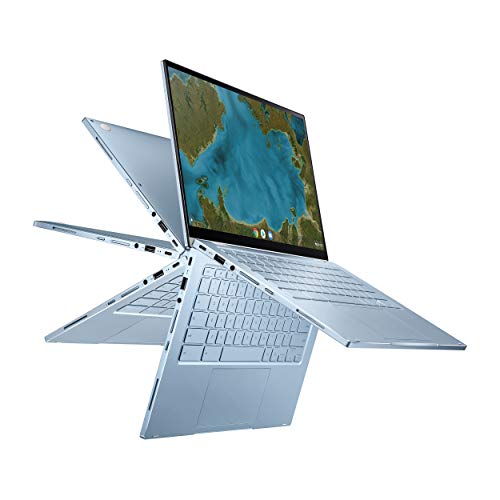
The ASUS Chromebook Flip C433 is an excellent and accessible entry-point for stylus-based work, particularly for students or those whose workflow is based in web applications. Its 14-inch Full HD touchscreen is framed by ultra-narrow bezels, providing a great view for drawing and note-taking. The robust 360-degree hinge allows you to easily switch between laptop, tent, stand, and tablet modes.
Running on Chrome OS, it offers a simple, secure, and fast environment perfect for Android-based drawing apps and web-based design tools. While it may not have the raw power of a workstation, its affordability and flexibility make it a compelling option for casual creators and those on a budget.
Dell XPS 13 (Latest Model) 9340

The Dell XPS 13 9340 combines legendary portability with a brilliant creative display. This model features a 13.4-inch 3K+ OLED touchscreen that delivers vibrant colors, deep blacks, and exceptional clarity, all while being compact and easy to carry. The anti-reflective and anti-smudge coating makes it practical for use in various lighting conditions.
With the latest Intel Core Ultra 7 processor and 32GB of RAM, it provides more than enough power for graphic design, photo editing, and other creative tasks. The XPS design is known for its premium build quality and minimalist aesthetic, making it a sophisticated choice for professionals who value both style and substance.
Microsoft Surface Laptop Studio 2
The Microsoft Surface Laptop Studio 2 represents the next generation of this innovative form factor, offering refined performance and reliability for professionals. It maintains the unique dynamic woven hinge that allows for seamless transitions between laptop, stage, and studio modes, providing the perfect angle for writing and drawing with a stylus.
This 2024 model is expected to feature more recent Intel Core i7 processors and enhanced graphics, providing a significant performance boost for demanding creative software and complex multitasking. It continues to offer deep integration with the Surface Slim Pen 2, making it a strong contender for those invested in the Microsoft ecosystem and its haptic inking technology.
HP Spectre x360 2-in-1 Laptop 16-f2000
The HP Spectre x360 16-f2000 is a premium 2-in-1 that balances a large, immersive display with a versatile design. Its 16-inch 2.8K OLED touchscreen is a visual treat, offering rich contrast and accurate colors that are essential for detailed creative work. The 360-degree hinge allows you to use it in any mode, from a traditional laptop to a flat drawing tablet.
Equipped with an Intel Core Ultra 7 processor, it is well-suited for a range of creative applications, from digital painting to video editing. The Spectre line is known for its elegant, gem-cut design and long battery life, making it an excellent choice for professionals who need a powerful and stylish laptop that can work all day.
Lenovo Yoga 9i 2-in-1 Gen 9
The Lenovo Yoga 9i Gen 9 is a refined 2-in-1 laptop that emphasizes a premium creative experience. It features a spacious 16-inch WQXGA OLED touch display, providing ample real estate and stunning visual fidelity for detailed artwork and design projects. The smooth 360-degree hinge ensures you can easily position it for comfortable sketching and note-taking.
Powered by the Intel Core Ultra 7 series, this laptop delivers efficient performance for everyday creative tasks. The Yoga 9i is also known for its excellent audio system and sleek, storm grey chassis, offering a well-rounded package for users who want a versatile machine that doesn’t compromise on media consumption or style.
Buying Guide: What to Look For in a Stylus Laptop
As a creative professional, I know that picking a laptop for stylus work isn’t just about specs; it’s about how the tool feels in your hand and responds to your pressure. The wrong choice can lead to frustrating lag, jittery lines, and a disconnected experience. To find the right machine among the many 8 laptops with the best stylus performance for creatives & professionals in 2025, you need to focus on a few key areas.
First, let’s talk about the digitizer and stylus technology. This is the heart of the experience. I always look for active electrostatic (ES) pens, like Wacom’s EMR technology or Microsoft’s Pen Protocol (MPP). These pens don’t require a battery, which makes them lighter and better balanced. Pay close attention to pressure sensitivity levels. While 4,096 levels used to be the standard, many premium models now offer 8,192 levels. This higher sensitivity gives you incredibly nuanced control over line weight and opacity, much like a real brush or pencil.
Next, consider the display. A high-resolution screen is a given, but for artists, the surface texture is just as important. A glossy screen can feel slippery, while some matte or “etched” glass displays provide a bit of tooth, similar to drawing on paper. This not only feels better but also reduces glare. Color accuracy is non-negotiable. Look for panels that cover 100% of the DCI-P3 color gamut and are factory-calibrated. You can’t trust your work if you can’t trust your screen.
Performance is obviously critical. You’ll want a powerful CPU, a dedicated GPU, and plenty of RAM to handle large files in apps like Photoshop, Illustrator, or Blender without stuttering. However, don’t overlook the physical design. A 2-in-1 convertible or a detachable form factor offers incredible flexibility, allowing you to use it as a traditional laptop for administrative tasks and as a digital canvas for drawing directly on the screen. Finally, check the palm rejection tech. It needs to be flawless, allowing you to rest your hand comfortably on the screen while you draw without making stray marks. Getting these elements right transforms a laptop from a simple computer into a powerful creative studio.
FAQ
Is a Wacom tablet better than a laptop with a built-in stylus?
This is a classic debate. A dedicated Wacom tablet, like a Cintiq, is often considered the gold standard for pure drawing feel and precision. However, an all-in-one laptop with a high-quality built-in stylus offers unparalleled portability and convenience. For professionals who travel, work in different locations, or need a single device for both computing and creation, a modern stylus laptop is a fantastic and powerful solution. The gap in performance has narrowed significantly, making them a compelling choice for many.
What is the difference between AES and MPP stylus technology?
Both are active pen protocols, but they have different origins and characteristics. AES (Active Electrostatic) is a standard championed by Wacom and is known for its excellent performance and the fact that many AES pens don’t require a battery. MPP (Microsoft Pen Protocol) is Microsoft’s technology, designed to work across a wide range of Windows devices. MPP pens often have a removable battery. In practice, the best implementations of both feel incredibly responsive. The choice often comes down to the specific laptop model and its optimization rather than the protocol alone.
How important is latency for digital art and note-taking?
Latency, or the delay between your stylus movement and the line appearing on screen, is critically important. High latency makes drawing feel disconnected and sluggish, which can disrupt your creative flow and make precise line work difficult. For smooth, natural-feeling writing and sketching, you want a latency of under 20 milliseconds, with many top-tier devices now achieving 10ms or less. This is a key factor that separates a good drawing experience from a great one.
Can I use any active stylus with my 2-in-1 laptop?
Generally, no. Styluses are not universally compatible across different laptop brands or even models from the same brand. They are designed to work with a specific digitizer technology (like AES, MPP, or EMR) embedded in the laptop’s screen. Always use the stylus recommended by the laptop manufacturer to ensure all features—like pressure sensitivity, tilt support, and buttons—work correctly. Using an incompatible pen can lead to poor performance or no functionality at all.
What should I look for to ensure my laptop remains a good creative tool for years?
Future-proofing your investment is smart. Focus on a device with more RAM (16GB minimum, 32GB or more is ideal) and a powerful, recent-generation processor. A dedicated graphics card is also a huge plus for video editing, 3D work, and complex digital paintings. Also, consider the quality of the pen technology itself; a well-implemented system from a leader in the field is less likely to feel outdated quickly. When reviewing the 8 laptops with the best stylus performance for creatives & professionals in 2025, I prioritize models that balance cutting-edge pen tech with strong core computing power.