Building a high-performance PC requires components that can handle extreme thermal loads, especially when pushing your system to its limits. For enthusiasts and overclockers, traditional air cooling often hits a ceiling, making water-cooled motherboards an essential foundation for any serious liquid-cooled build. These specialized boards integrate water blocks directly onto the VRMs and chipset, offering superior heat dissipation and unlocking stable performance under the most demanding workloads.
Choosing the right water-cooled motherboard is a critical decision that impacts your entire system’s potential, compatibility, and longevity. This roundup for 2025 examines the top-tier options from leading manufacturers like ASUS, GIGABYTE, and ASRock, covering both the latest Intel and AMD platforms. We have curated a list of ten exceptional models to help you find the perfect foundation for your next epic water-cooled rig.
The Best Water-Cooled Motherboards for Your Build
- GIGABYTE Z590 AORUS Xtreme WATERFORCE
- Asus ROG Maximus XIII Extreme Glacial
- ASUS ROG Maximus XII Formula Z490
- ASRock Z490 Aqua Water Cooling
- ASUS ROG X570 Crosshair VIII Formula
- ASUS ROG Maximus Z790 Hero WiFi6E
- ASRock AMD X870E Taichi
- ASUS ROG Strix Z790-E Gaming WiFi 6E
- MSI MPG Z790 Carbon WiFi II Gaming
- MSI MEG Z790 GODLIKE Water-Cooling
GIGABYTE Z590 AORUS Xtreme WATERFORCE

The GIGABYTE Z590 AORUS Xtreme WATERFORCE is a statement piece for Intel builders, featuring a comprehensive full-coverage water block. This board is engineered to support 11th and 10th Gen Intel Core processors, providing a robust platform for high-end computing. Its integrated cooling solution is designed to manage heat from critical components, ensuring consistent performance during intensive tasks.
Power delivery is a key strength, with a 20+1 phase digital VRM solution employing 100A Smart Power Stages. This setup, combined with a Tantalum Polymer Capacitors Array, offers clean and stable power for demanding overclocks. The board also includes advanced networking with both 2.5GbE and AQUANTIA 10GbE LAN, making it a solid choice for users with high-speed data transfer needs.
Asus ROG Maximus XIII Extreme Glacial

For users seeking a no-compromise solution, the Asus ROG Maximus XIII Extreme Glacial comes with a pre-installed EK water block that cools the VRM, CPU, and PCH. This integrated approach simplifies the custom loop building process and provides exceptional thermal performance right out of the box. It is built for the LGA 1200 socket to maximize the performance of 11th Gen Intel Core processors.
This motherboard is packed with intelligent features, including AI Overclocking, AI cooling, and AI noise cancellation that automatically optimize system settings. The DIY-friendly design includes a pre-mounted I/O shield, BIOS FlashBack, and a 2” LiveDash color OLED for real-time system status updates. With five M.2 slots and Thunderbolt 4 support, it offers extensive connectivity and expansion.
ASUS ROG Maximus XII Formula Z490
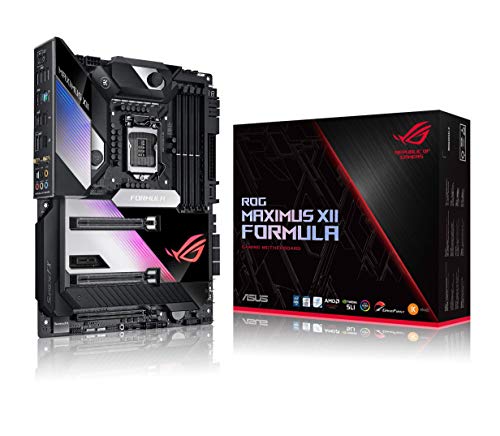
The ASUS ROG Maximus XII Formula Z490 offers a versatile hybrid cooling solution with its CrossChill EK III VRM block. This design allows for effective cooling using either air or water, giving builders flexibility. It is designed to support 10th Gen Intel Core processors, providing a powerful and reliable foundation for a high-performance system.
Power delivery is handled by a robust 16-phase power stage design, with each stage rated for 70 amps. This ensures reliable power delivery even under heavy overclocking conditions. The board also features a solid steel backplate for added structural integrity and thermal dissipation, alongside high-quality alloy chokes and durable capacitors for long-term stability.
ASRock Z490 Aqua

The ASRock Z490 Aqua is a premium, limited-edition motherboard built for custom water-cooling enthusiasts. It supports both 10th and 11th Gen Intel Core processors, offering broad compatibility for high-end Intel builds. Its aesthetic is defined by a sleek, monochromatic design that integrates a full-coverage water block.
This board supports high-speed memory, with official support for DDR4 4800 MHz and beyond via overclocking. While its expansion slots are more focused, with one PCIe 3.0 x16 slot, it is built for users who prioritize a clean, single-GPU water-cooled setup with maximum thermal performance for the CPU and power delivery system.
ASUS ROG X570 Crosshair VIII Formula
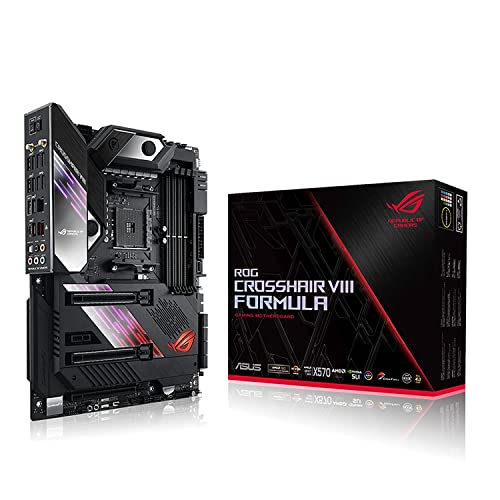
The ASUS ROG X570 Crosshair VIII Formula is a top-tier choice for AMD enthusiasts, featuring an integrated CrossChill EK III water block. It is designed for the AM4 socket, making it a perfect partner for Zen 3 Ryzen 5000 and 3rd Gen AMD Ryzen CPUs. The board also supports PCIe 4.0, enabling the fastest available storage and graphics speeds.
Its comprehensive thermal design includes an active PCH heatsink and M.2 aluminum heatsinks to keep all components running cool. For networking, it provides onboard WiFi 6 and a combination of 5G and Gigabit Ethernet, all protected by ASUS LanGuard for improved reliability and electrostatic protection.
ASUS ROG Maximus Z790 Hero WiFi6E
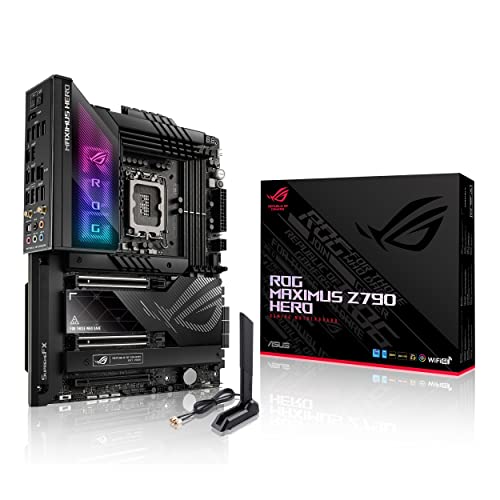
The ASUS ROG Maximus Z790 Hero is built for the latest Intel platforms, supporting 12th, 13th, and 14th Gen processors on the LGA 1700 socket. It is ready for modern technologies like PCIe 5.0 and DDR5 memory, providing a forward-looking foundation for a high-end build. While it may require a separate water block, its design accommodates high-flow custom loops.
This motherboard features intelligent tools like AI Overclocking and AI Cooling II to automatically optimize performance and thermal management. The power delivery system is exceptionally robust, with 20+1 teamed power stages rated for 90A, ensuring stable power for even the most powerful multi-core CPUs.
ASRock AMD X870E Taichi

The ASRock X870E Taichi represents the cutting edge for AMD’s AM5 platform, supporting the latest Ryzen processors. It is built for the future with support for high-speed DDR5 memory, with capacities up to 256 GB and speeds reaching 8200 MHz. This EATX motherboard offers ample space for components and robust power delivery.
It is equipped with four M.2 sockets for extensive storage options and features onboard USB4 for the latest high-speed connectivity. The “Ultimate VRM Power” design ensures that the CPU receives clean and stable power, which is critical for maintaining performance in both gaming and content creation scenarios.
ASUS ROG Strix Z790-E Gaming WiFi 6E
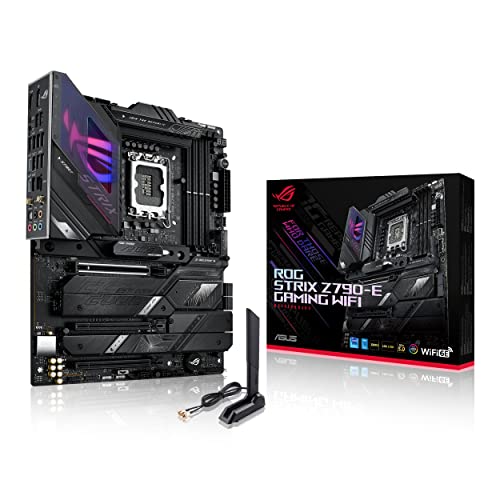
The ASUS ROG Strix Z790-E Gaming WiFi 6E is a high-performance ATX motherboard ready for Intel’s 12th, 13th, and 14th Gen processors. It supports the latest standards with PCIe 5.0 and DDR5 memory, providing a solid base for a powerful gaming system. Its feature set is designed to make advanced tuning accessible.
AI enhancements are a core part of its design, including AI Overclocking, AI cooling II, and AI networking to intelligently manage system resources. The 18+1 power stage configuration, with each stage rated for 90A, is built to handle the power demands of modern multi-core CPUs with ease, supported by high-quality durable components.
MSI MPG Z790 Carbon WiFi II

The MSI MPG Z790 Carbon WiFi II is a modern motherboard supporting the full range of Intel’s 12th to 14th Gen Core processors. It embraces next-generation connectivity with PCIe 5.0 slots and Lightning Gen 5 x4 M.2 support, allowing for the fastest available SSDs. This board is an excellent foundation for a high-speed gaming PC.
It features cutting-edge wireless connectivity with Wi-Fi 7 and Bluetooth 5.4, ensuring your system is ready for the future of networking. With support for DDR5 memory at speeds exceeding 7800 MHz, it provides the bandwidth necessary for smooth performance in the most demanding applications and games.
MSI MEG Z790 GODLIKE Water-Cooling
The MSI MEG Z790 GODLIKE represents the absolute peak of the company’s motherboard engineering, designed for builders who demand the utmost in performance and features. It supports Intel’s 12th, 13th, and 14th Gen processors on the LGA 1700 socket and is built to accommodate extreme overclocking and custom water-cooling loops with its integrated solution.
As a flagship model, it is expected to include the most robust power delivery system, extensive connectivity options including multiple PCIe 5.0 slots, and high-speed networking. The integrated water-cooling is designed to manage heat from the VRMs and chipset, maintaining system stability under the highest possible loads for professional creators and competitive overclockers.
Buying Guide: What to Look For in a Water-Cooled Motherboard in 2025
So, you’re planning a custom water-cooling loop and the motherboard is your next target. It’s a fantastic way to push performance and achieve a clean, integrated look. But before you spend your hard-earned cash, there are a few key things I always check for.
First up is the socket compatibility. This is non-negotiable. For Intel, you’re likely looking at LGA 1851 for the latest Arrow Lake CPUs, while AMD builders will be focused on the AM5 platform. Make sure the board you pick not only has the right socket but also has a VRM (Voltage Regulator Module) design that’s robust enough to handle an overclocked, water-cooled chip. You’re investing in extreme cooling, so the board needs to deliver stable power without breaking a sweat.
Next, examine the board’s integrated water-cooling features. Some high-end models come with pre-installed monoblocks that cool both the CPU and the critical power delivery components (VRMs). This is a huge plus for aesthetics and performance. If the board doesn’t have a block, check that it has standard G1/4″ threaded fittings that are compatible with your chosen brand of water blocks. I also look closely at the layout. Are the inlet and outlet ports easy to access once the board is installed? Is there enough clearance around the CPU socket for a large block and your tubing runs?
Connectivity and internal headers are just as important. You’ll need enough PWM/DC fan headers to control all the radiator fans in your loop. A dedicated water pump header is a must-have for providing the full power and control your pump needs. For monitoring, a temperature sensor header is incredibly useful for having your loop’s coolant temperature control your fan curves, making the system much quieter. Don’t forget about the physical PCIe slot spacing; a thick water block on a graphics card might cover the slot below it on some boards.
Finally, consider your overall ecosystem. Many of the best water-cooled motherboards in 2025 are part of a larger family of components, like the ASUS ROG Maximus or the GIGABYTE AORUS Xtreme series. Sticking with one brand can sometimes simplify RGB and fan control through a single software suite. Think about your build’s theme, your budget, and what features are truly essential for your overclocking and performance goals. It’s all about finding the right balance.
Frequently Asked Questions
Is a water-cooled motherboard necessary for a custom loop?
Not at all. A custom water-cooling loop is perfectly effective with a standard motherboard and a high-quality CPU water block. A dedicated water-cooled motherboard, often with a monoblock, is an enthusiast-grade choice. It’s for builders who want the absolute best thermal performance for both the CPU and VRMs, or those who are chasing the ultimate in aesthetic integration with a clean, tubing-focused look.
Do these motherboards come with the water blocks pre-installed?
It depends on the specific model. Some ultra-high-end boards, like certain ASUS ROG Maximus or EVGA Dark series, do come with a monoblock already mounted. However, many “water-cooling ready” motherboards simply have the necessary mounting points and a layout designed for aftermarket blocks. You often have to purchase the full-cover or monoblock separately. Always double-check the product listing to see what’s included in the box.
Are water-cooled motherboards only for extreme overclocking?
While they are a favorite among extreme overclockers for their superior VRM cooling, they aren’t only for that. If you’re running a high-core-count CPU like a Threadripper or a top-tier Intel Core i9, a monoblock can help maintain higher boost clocks for longer periods, even in daily use. For me, the appeal is also heavily visual; it creates a much cleaner and more impressive build compared to a large air cooler or a standard CPU block.
What is the biggest maintenance concern with a water-cooled motherboard?
The primary concern is the same as with any custom loop: the risk of a leak. A leak over a motherboard is a catastrophic event. This is why pressure testing your loop before powering on is absolutely critical. Maintenance-wise, having a monoblock means you have more components to clean during a loop flush. The narrow channels in a monoblock can be more susceptible to clogging if you use coolants with particles or if there’s any buildup in the system.
Can I use any brand of water block on any motherboard?
No, you cannot. Water blocks are designed for specific motherboard models and their unique PCB layouts. An EK monoblock made for an ASUS ROG Crosshair X670E won’t fit on a GIGABYTE AORUS model. You must ensure compatibility by checking the block manufacturer’s compatibility list. This is one of the most critical steps when planning your build to avoid a very expensive mistake.
How do I control the fans and pump with one of these setups?
Modern motherboards, especially the ones suited for this task, are packed with headers to help. You’ll typically connect your water pump to a dedicated “PUMP” header, which provides more power. Your radiator fans can be connected to standard PWM fan headers. For the best results, I use the motherboard’s BIOS or software to create a fan curve that is based on the “water temperature” from a coolant temperature sensor, which you plug into a dedicated “T_SENSOR” header. This makes the system much quieter, as fan speeds are tied to the actual coolant heat rather than the CPU’s rapid temperature spikes.