Choosing the right RAM is a critical decision for any PC build or upgrade, directly impacting system responsiveness, application performance, and multitasking capabilities. With a myriad of brands and specifications available, from high-speed gaming kits to massive capacity workstation modules, navigating the market can be a complex task. The best RAM brand for you depends on your specific needs, whether that’s raw speed, brilliant RGB lighting, or a reliable, low-profile design.
This roundup for 2025 highlights ten standout memory kits from leading manufacturers, showcasing the diversity and innovation in the current market. We have evaluated products based on their performance, features, compatibility, and overall value to help you make an informed decision. From Corsair’s iconic Vengeance series to Kingston’s FURY line and value-focused options from OLOy, there is a perfect RAM solution for every build and budget.
Our Top Picks for the Best RAM in 2025
- Corsair Vengeance RGB Pro 128GB DDR4 3200
- Corsair Vengeance LPX 16GB (2x8GB) 3200MHz
- Kingston FURY Renegade RGB 64GB 3600MHz DDR4
- Kingston FURY Beast RGB 16GB 3600MT/s DDR4
- XPG DDR4 D50 RGB 16GB (2x8GB) 3200MHz
- ADATA XPG GAMMIX D10, 16GB (2 x 8GB) DDR4
- OLOy DDR4 RAM 64GB Warhawk Aura Sync RGB
- OLOy DDR4 RAM 16GB (2x8GB) 3000 MHz
- Kingston Fury Beast 8GB 3200MHz DDR4
- Corsair Vengeance LPX 16GB DDR4 DRAM 3200MHz
Corsair Vengeance RGB Pro 128GB DDR4 3200
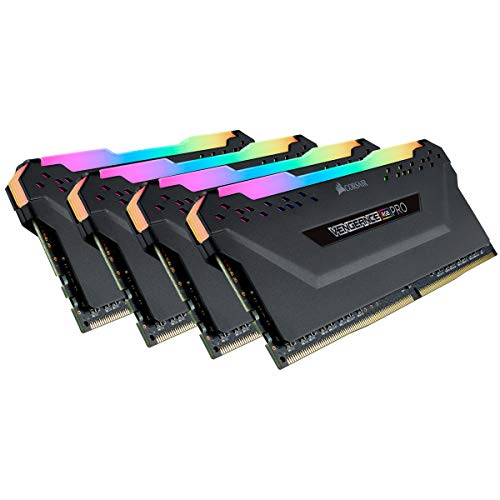
For users who demand extreme multitasking capabilities and high-end content creation performance, this 128GB kit from Corsair is a formidable choice. It provides an immense amount of headroom for running multiple virtual machines, editing high-resolution video, and working with massive datasets without any slowdown. The sheer capacity ensures that your system will handle intensive workloads with ease.
Beyond its raw power, this memory kit is a centerpiece for any build with its vibrant RGB lighting. Each module features ten individually addressable RGB LEDs, offering stunning, animated lighting effects. You can take full control and synchronize the lighting with other compatible components using the powerful CORSAIR iCUE software, creating a perfectly unified aesthetic for your entire system.
Corsair Vengeance LPX 16GB (2x8GB) 3200MHz

The Corsair Vengeance LPX is a legendary choice for builders seeking reliable performance without the flash of RGB. Its core strength lies in its high-performance construction, utilizing hand-sorted memory chips to ensure stability and provide generous overclocking headroom for enthusiasts. This kit is optimized for wide compatibility with the latest Intel and AMD DDR4 motherboards, making it a safe and effective choice for a wide range of systems.
A key advantage of the LPX series is its low-profile design. With a height of just 34mm, these modules are engineered to fit comfortably in most small-form-factor builds where larger heat spreaders might cause clearance issues with CPU coolers. This combination of performance, compatibility, and a compact form factor makes it an incredibly versatile and popular option.
Kingston FURY Renegade RGB 64GB 3600MHz DDR4

Striking a balance between high capacity and fast speeds, the Kingston FURY Renegade RGB is an excellent kit for serious gamers and power users. The 64GB capacity is more than sufficient for demanding games and heavy multitasking, while the 3600MHz speed helps ensure smooth performance and quick load times. It comes with Intel XMP Certified profiles for easy, one-click configuration and optimization on compatible systems.
The RGB lighting on these modules is both vibrant and precisely synchronized. Kingston employs its patented Infrared Sync Technology to ensure all LEDs across the modules remain perfectly in sync, creating a seamless and fluid lighting effect without the need for extra wiring. This results in a clean and professional look that enhances any gaming rig or workstation.
Kingston FURY Beast RGB 16GB 3600MT/s DDR4

This single 16GB module from the Kingston FURY Beast line offers a great starting point for a new build or an easy upgrade path. Operating at a swift 3600MT/s, it provides a noticeable performance boost for gaming and everyday applications. Like its Renegade sibling, it is Intel XMP-ready for simple setup and is also designed for compatibility with AMD Ryzen systems.
The heat spreader features an aggressive, angular design complemented by stunning RGB lighting. The integrated patented Infrared Sync Technology ensures that the lighting effects across multiple modules are perfectly uniform, creating a cohesive visual experience. This makes it an ideal component for users who want to add a dynamic RGB element to their system with minimal effort.
XPG DDR4 D50 RGB 16GB (2x8GB) 3200MHz

The XPG D50 RGB kit combines solid performance with a distinctive and modern aesthetic. The large, textured heat spreader not only aids in heat dissipation but also provides a substantial canvas for its vibrant RGB lighting. With a speed of 3200MHz, this 16GB kit is well-suited for mainstream gaming and productivity tasks.
You have multiple options for customizing the lighting effects. The modules can be controlled through the XPG RGB Sync App or are compatible with the major RGB software from motherboard manufacturers like ASUS, MSI, and Gigabyte. This flexibility allows you to easily integrate the RAM’s lighting into your existing ecosystem for a synchronized look.
ADATA XPG GAMMIX D10, 16GB (2 x 8GB) DDR4

The ADATA XPG GAMMIX D10 is a no-nonsense memory kit that focuses on delivering reliable performance and value. Its unique heatsink design is engineered for efficient heat dissipation, which helps maintain stability during long gaming sessions or extended periods of use. This makes it a dependable choice for budget-conscious builders.
Another significant benefit is its low-profile design. The compact heat spreader ensures effortless installation and excellent compatibility with a wide range of CPU coolers, eliminating potential clearance concerns. It supports the latest Intel platforms and provides a straightforward, performance-oriented solution for any build.
OLOy DDR4 RAM 64GB Warhawk Aura Sync RGB

OLOy’s Warhawk series offers a high-capacity 64GB kit with an eye-catching design and vibrant RGB lighting. With a frequency of 3200MHz, it provides ample performance for gaming, streaming, and content creation. The integrated Intel XMP 2.0 support allows for automated overclocking, making it simple to achieve the advertised speeds without manual configuration.
The bold aesthetic of the heat spreader is designed to stand out, and the RGB lighting is compatible with Aura Sync, allowing for synchronization with other supported components in an ASUS ecosystem. This kit represents a value-oriented path to building a high-capacity, visually striking system.
OLOy DDR4 RAM 16GB (2x8GB) 3000 MHz
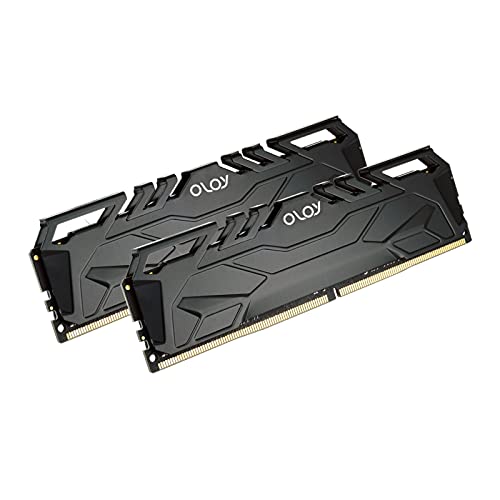
This OLOy 16GB kit is an excellent entry-level option for budget builds and office computers. Running at 3000MHz, it offers a solid performance uplift over basic JEDEC speeds, contributing to a more responsive computing experience for everyday tasks and light gaming. The use of Intel XMP 2.0 technology ensures setup is quick and hassle-free.
It provides a straightforward and reliable upgrade path for systems needing more memory without the need for RGB lighting or elaborate heat spreaders. For users seeking functional performance at an accessible price point, this kit delivers exactly what is needed.
Kingston Fury Beast 8GB 3200MHz DDR4

As a single 8GB module, the Kingston Fury Beast is the perfect component for a minor upgrade or to complete a dual-channel configuration. Its 3200MHz speed and low-latency CL16 timing offer a cost-efficient performance boost for systems that are currently memory-constrained. It is Intel XMP-ready for easy installation and optimal performance.
The module features a low-profile heat spreader design that effectively manages temperatures while maintaining a compact form factor. This makes it an ideal, no-fuss solution for users who need to add a bit more high-performance memory to their system without any compatibility concerns.
Corsair Vengeance LPX 16GB DDR4 DRAM 3200MHz
This particular Corsair Vengeance LPX kit reaffirms the series’ reputation as a go-to for reliable, high-performance memory. The 16GB capacity in a 2x8GB configuration is the sweet spot for most gamers and general users, providing excellent multitasking capabilities. With a speed of 3200MHz and tight timings, it ensures smooth operation in games and applications.
Built with a high-performance PCB and a custom-designed aluminum heat spreader, the LPX modules are built for consistent performance and effective heat dissipation. The low-profile nature guarantees broad compatibility, making it one of the most trusted and widely recommended memory kits on the market for a reason.
How to Choose the Best RAM for Your PC in 2025
When I’m looking to build or upgrade a computer, picking the right RAM is one of the most important decisions. It’s not just about grabbing the shiniest kit with the biggest numbers. You need to think about what your computer’s brain, the motherboard and CPU, can actually handle. The first thing I always check is compatibility. You can’t use DDR5 RAM on a motherboard that only supports DDR4, and vice-versa. Your motherboard’s specifications will tell you which generation it uses, the maximum speed it supports, and the maximum capacity per slot.
Once I know what’s compatible, I think about capacity. For a basic office or web-browsing PC, 16GB is usually plenty. But if I’m into gaming or run heavy applications like video editing software, I aim for 32GB. For serious content creation, engineering workloads, or hardcore gaming, 64GB or more is the way to go. It’s better to have a little more than you need than to run out and slow everything down.
Then there’s speed, measured in Megahertz (MHz). A higher number means faster data transfer, which can lead to snappier performance. However, there’s a point of diminishing returns. Paying a huge premium for the absolute fastest RAM might only give you a 1-2% performance boost in games compared to a good, fast kit. I look for a sweet spot that my CPU is known to work well with. Latency, or timings (shown as a series of numbers like CL40), is also a factor. Lower latency is better, but it often comes with a higher price tag.
Finally, I consider the physical look. If my PC has a window, I might want RAM with a cool heat spreader and RGB lighting to match my theme. But for a simple workhorse build, a low-profile kit without flashy lights is perfect, especially if I have a large air cooler that might block taller sticks. By balancing these factors—compatibility, capacity, speed, and aesthetics—I can find the perfect RAM from the best RAM brands for my specific needs and budget without overspending on features I won’t truly benefit from.
FAQ
Is there a real performance difference between the top RAM brands?
Yes, but it’s often more about reliability, warranty, and customer support than raw speed. Most of the top manufacturers use memory chips from the same major suppliers like Samsung, SK Hynix, or Micron. Where they differ is in the quality of the printed circuit board (PCB), the design of the heat spreader, and how rigorously they test their modules for stability. A reputable brand from the top 10 best RAM manufacturers in 2025 gives me peace of mind that the RAM will work as advertised and that the company will stand behind its product if something goes wrong.
How much RAM do I really need for gaming in 2025?
For gaming in 2025, I consider 32GB to be the new sweet spot. While many games still run fine on 16GB, newer and more demanding titles are starting to push past that limit, especially if you like to have other applications open in the background, like Discord or a web browser. Having 32GB ensures that the game has plenty of room to operate without having to constantly swap data to your slower SSD, which can prevent stutters and frame rate drops. For a high-end system, 32GB is practically a standard.
Do I need to enable anything in my BIOS after installing new RAM?
Almost always, yes. When you first install RAM, most motherboards will run it at a standard, conservative speed called JEDEC, which is often much lower than the advertised speed on the box. To get the performance you paid for, you need to go into your computer’s BIOS or UEFI settings and enable the XMP (Extreme Memory Profile) for Intel platforms or EXPO (Extended Profiles for Overclocking) for AMD platforms. This is a one-click setting that automatically configures your RAM to run at its rated speed and timings. It’s not overclocking in the traditional sense; it’s just setting the RAM to its designed specification.
Can I mix and match RAM kits from different brands?
You can try, but I don’t recommend it. Even if two kits have the same advertised speed and capacity, they might use different memory chips or have different internal timings. When you mix them, the motherboard has to find a common setting that all the sticks can run at, which usually means downclocking everything to the speed of the slowest module and using the loosest (slower) timings. This can lead to system instability, crashes, or failure to boot. For the best and most reliable performance, I always use a matched kit that was tested to work together.
Is DDR5 worth the extra cost over DDR4?
In 2025, for any new PC build, I would say yes, DDR5 is absolutely worth it. While DDR4 is still capable and more affordable, DDR5 offers significantly higher base speeds and better future-proofing. New CPUs and platforms are being optimized for DDR5, and the price gap has narrowed considerably. The performance benefits in both gaming and productivity applications are now much more pronounced. Unless I’m building a very budget-conscious system with a last-generation platform, I’m going with DDR5 for its higher bandwidth and efficiency.