Building a white-themed PC is more than just an aesthetic choice; it’s a statement. A pristine white chassis serves as the perfect canvas for your components, making RGB lighting pop and creating a clean, modern look that stands out from the sea of black boxes. Whether you’re aiming for a minimalist build or a vibrant RGB showcase, the right case sets the tone for your entire project.
From spacious mid-towers ready for custom water loops to innovative open-frame designs, the market is filled with excellent white options. This roundup covers the best white PC cases available, highlighting their unique features, cooling potential, and build quality to help you find the perfect foundation for your next stunning build.
The Best White PC Cases for a Stunning Build
- ASUS ROG Strix Helios GX601 White Edition RGB Mid-Tower Case
- LIAN LI LANCOOL 2 WHITE Tempered Glass ATX Case
- be quiet! Pure Base 500DX ATX Midi Tower PC case | ARGB
- Cooler Master MasterBox TD500 Mesh White Airflow ATX Mid-Tower
- Thermaltake Core P3 ATX Tempered Glass Gaming Computer Case
- NZXT H210 – Mini-ITX PC Gaming Case – Matte White
- HYTE Y60 Modern Aesthetic Dual Chamber Panoramic Tempered Glass Case
- be quiet! Pure Base 501 Black PC case | Mid Case | USB 3.2 Gen
- NZXT H9 Flow (2025) – Large Dual-Chamber ATX Mid-Tower Airflow PC Case
- NZXT H510 – Compact ATX Mid-Tower PC Gaming Case – White/Black
ASUS ROG Strix Helios GX601 White Edition RGB Mid-Tower Case
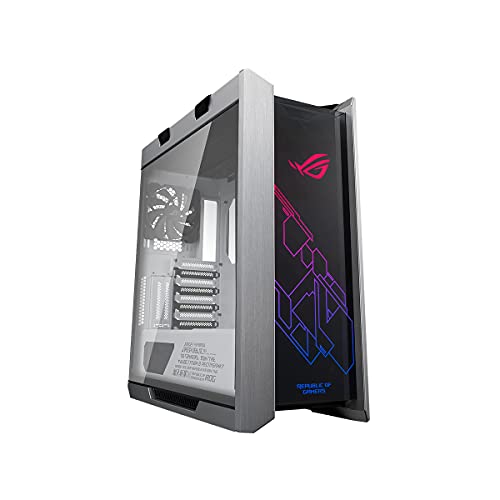
The ASUS ROG Strix Helios is a premium showcase case designed for builders who demand the best. It features a striking brushed-aluminum frame and three tempered-glass panels, offering a near-panoramic view of your components. Integrated Aura Sync RGB front lighting synchronizes with a vast ecosystem of compatible gear for a unified aesthetic.
Inside, the build process is simplified with thoughtful features. A multifunction cover includes dedicated graphics card holders to prevent GPU sag, while a PSU shroud and translucent rear cable cover make cable management straightforward for a clean final look. You also get versatile GPU mounting options, allowing for standard installation of three cards or a vertical mount for two using the included bracket, perfect for highlighting your graphics card.
LIAN LI LANCOOL 2 WHITE Tempered Glass ATX Case
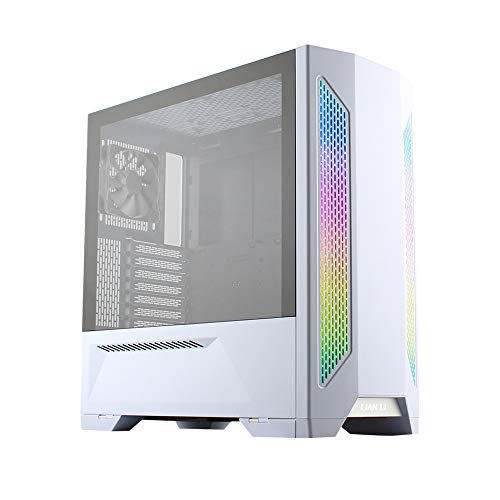
The Lian Li Lancool II White is a masterclass in balancing performance, flexibility, and clean design. Its interior is engineered for a clutter-free build with the Cable Management 2.0 system, which uses cable door covers to easily conceal wires. The case is also future-proof, offering an upgradable front panel that can include a USB 3.1 Type-C port for modern devices.
Cooling configuration is highly versatile thanks to a multi-way fan and radiator bracket at the front, supporting sizes up to 360mm. This flexibility allows you to optimize airflow for your specific components. A unique HDD hot-swap feature adds a layer of convenience for users who frequently transfer data, making this case as functional as it is beautiful.
be quiet! Pure Base 500DX ATX Midi Tower PC case
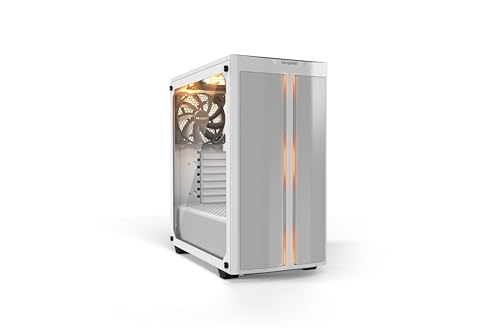
be quiet! is renowned for its silent operation, and the Pure Base 500DX brilliantly combines this with high airflow and modern aesthetics. The case features a high-airflow intake front panel and top cover, ensuring your components stay cool even under load without compromising on acoustic performance. Three pre-installed Pure Wings 2 fans provide a solid foundation for excellent cooling right out of the box.
Subtle yet effective ARGB lighting strips at the front and inside the case add a touch of personality without being overwhelming. The inclusion of a USB 3.1 Type-C Gen. 2 port on the front I/O panel ensures you have the latest connectivity for fast data transfer, making this case a well-rounded choice for builders who value performance, silence, and a clean look.
Cooler Master MasterBox TD500 Mesh White Airflow ATX Mid-Tower

The Cooler Master TD500 Mesh is built for users who prioritize cooling performance. Its defining feature is the polygonal mesh front panel, which has a 3D-contoured design that is both visually distinct and highly effective at drawing in cool air while filtering out dust. This ensures your system runs at optimal temperatures during intense gaming sessions.
This case comes ready to shine with three included addressable RGB fans that flood the interior with vibrant lighting while moving a considerable amount of air. The crystalline tempered glass side panel is precision-engineered for strength and adds a unique textural element to the case’s appearance, showcasing your build in a distinctive way.
Thermaltake Core P3 ATX Tempered Glass Gaming Computer Case
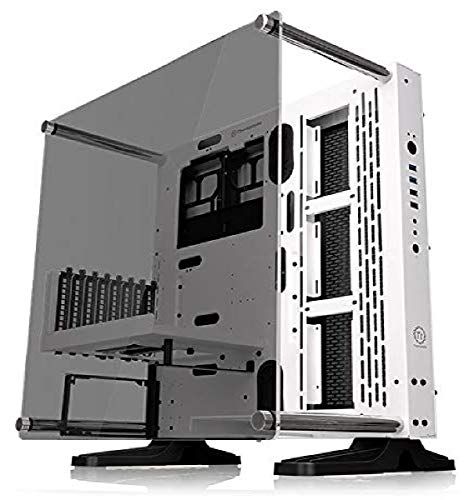
The Thermaltake Core P3 is not a traditional case; it’s an open-frame chassis that redefines how you display your PC. Its panoramic 5mm thick tempered glass front panel offers an unobstructed view of your hardware, turning your build into a true work of art. This design is ideal for custom water-cooling loops where you want every component and tube to be visible.
Its versatility is a major selling point, as it supports three-way placement: wall-mounted, vertical, or horizontal. This allows you to integrate it into your space in the most impactful way. Thermaltake includes a PCIe riser cable, enabling a vertical GPU mount right out of the box to proudly showcase your graphics card as the centerpiece of the build.
NZXT H210 – Mini-ITX PC Gaming Case – Matte White

The NZXT H210 proves that small form factor builds don’t have to sacrifice style or cable management. This Mini-ITX case carries the clean, modern design language of its larger siblings, featuring an iconic cable management bar and an uninterrupted tempered-glass side panel to showcase your compact build beautifully. A front I/O USB Type-C port provides modern connectivity.
Despite its small size, the H210 is designed for a straightforward building experience. NZXT’s patented cable routing kit, with pre-installed channels and straps, makes wiring easy and intuitive, ensuring you can achieve a clean look even in a tight space. It’s also water-cooling ready, offering more flexibility for keeping your high-performance SFF components cool.
HYTE Y60 Modern Aesthetic Dual Chamber Panoramic Tempered Glass Case

The HYTE Y60 has quickly become an icon for its breathtaking design. Its 3-piece panoramic tempered glass design eliminates the corner pillar, offering unparalleled views of your components from multiple angles. This makes it the ultimate case for photography and display, allowing your build to be the centerpiece of any room from any vantage point.
This case is built around the concept of showcasing your GPU. It exclusively uses a vertical GPU mount, presenting your graphics card in the most flattering way possible. HYTE includes a PCIe 4.0 riser cable with a unique protective shroud that integrates seamlessly into the case’s dual-chamber layout, which also helps with thermal performance and cable management.
be quiet! Pure Base 501 Black PC case
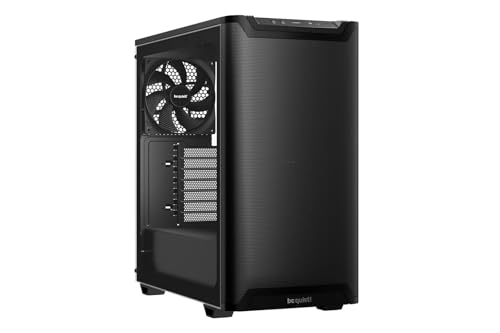
The be quiet! Pure Base 501 is crafted for users who appreciate a minimalistic and streamlined design with a strong focus on quiet operation. Its optimized construction and sound-dampening materials work to reduce noise, creating a peaceful computing environment without sacrificing performance. It comes with two preinstalled Pure Wings 3 fans that are tuned for a balance of airflow and low noise.
Beyond its quiet nature, the case offers substantial cooling potential, supporting up to a 360mm radiator in the front and additional fans up top. A standout feature is its flexible GPU installation; the PCIe slots can rotate 90 degrees for vertical GPU mounting, supported by an optional riser cable. This helps prevent GPU sag and adds a custom look to your build.
NZXT H9 Flow (2025) – Large Dual-Chamber ATX Mid-Tower Airflow PC Case

The NZXT H9 Flow represents a modern take on the dual-chamber case, separating the main components from the PSU and drives for improved thermal performance and vastly simplified cable management. This design keeps wires hidden and allows for unobstructed airflow through the main chamber, which is crucial for high-performance builds.
Airflow is a key focus, with perforated steel panels on the top, front, and side. Angled front-right fans ensure efficient cooling by directly channeling air across your motherboard and GPU. NZXT includes four pre-installed fans (three 140mm and one 120mm), providing excellent out-of-the-box cooling and making it a great value for builders who don’t want to immediately invest in extra fans.
NZXT H510 – Compact ATX Mid-Tower PC Gaming Case – White/Black
The NZXT H510 is a classic compact ATX case known for its timeless, minimalist design. It offers a clean interior that is easy to build in, thanks to NZXT’s renowned cable management system. This system includes dedicated routing channels and a removable bracket that makes it simple to achieve a tidy and professional-looking build, even for first-time builders.
This case includes modern conveniences like a front I/O USB Type-C port for fast data transfer with compatible devices. The tempered glass side panel showcases your components, while the smart layout is water-cooling ready for those looking to add more advanced cooling solutions later. The H510 remains a popular and reliable choice for a clean, no-fuss white build.
Buying Guide: How to Choose a White PC Case
Putting together a white-themed PC build is an exciting project, and the case is the centerpiece that ties everything together. It is not just about the color; it is about finding the right foundation for your components and your personal style. With so many options out there, knowing what to prioritize can save you a lot of time and potential frustration.
First, consider the size and form factor. This is the most critical step because it dictates what components will fit inside. Full-tower cases are massive and offer the most space for custom water-cooling loops and multiple graphics cards, but they are overkill for most people. Mid-tower cases are the sweet spot, providing excellent compatibility with standard ATX motherboards and plenty of room for long GPUs and multiple cooling fans. If you are building a compact system, look for Mini-ITX or Micro-ATX cases, but be extra careful to check clearances for your power supply, CPU cooler, and graphics card.
Next, think about airflow. A beautiful case is useless if it turns into an oven for your expensive parts. Look for cases with mesh front panels, as these are almost always superior to solid glass or plastic panels for bringing cool air inside. Check how many fans are included and where you can mount more. Good cable management is also a part of good airflow; cases with plenty of routing holes, Velcro straps, and space behind the motherboard tray make it easy to keep cables tidy and out of the way of the main airflow path.
Finally, focus on the features that matter to you. How many drive bays do you need for your storage? Do you want a tempered glass side panel to show off your components? Is there a USB-C port on the front I/O panel for modern devices? Also, pay attention to the finish. Not all “white” is the same. Some cases have a brilliant, glossy finish, while others are a more subtle matte or textured white. Some even use a two-tone design with black or gray accents. Looking at high-quality photos and reviews will give you the best sense of the actual color and build quality. Taking the time to consider these factors will help you find one of the 10 best white PC cases for your next white-themed build that is both beautiful and functional.
FAQ
Are white PC cases harder to keep clean than black ones?
This is a common concern, and yes, white cases can show dust and smudges more easily than black ones. However, the difference is often not as dramatic as people think. Dust is typically a light gray color, which is actually more visible on a glossy black surface. On a matte white finish, it can be less obvious. Regular cleaning with a can of compressed air and a microfiber cloth is all it takes to keep any case looking new, regardless of color.
Will a white interior make my components run hotter?
No, the interior color of your case has no measurable impact on component temperatures. What matters is the case’s airflow design—the placement and number of fans, the presence of mesh panels, and the internal layout. A well-ventilated white case will always run cooler than a poorly designed black case. Focus on the case’s cooling potential, not its paint job.
Do all my components need to be white for the build to look good?
Not at all! While an all-white build is stunning, a mix of white and black components can create a fantastic “stormtrooper” or panda-style aesthetic that looks very intentional and clean. Often, using a white case, white fans, and a white CPU cooler is enough to establish the theme, allowing you to use a black motherboard and graphics card that might be more readily available or affordable.
What should I look for in cable management with a white case?
Since the interior is often visible through a side panel, cable management is crucial. Look for a case with plenty of room behind the motherboard tray (at least an inch is good), numerous cable routing holes with rubber grommets, and pre-installed Velcro straps or tie-down points. Using a set of white or white-sleeved extension cables can also make a huge difference in completing the clean look of your 10 best white PC cases for your next white-themed build.
Is a glossy or matte white finish better?
This comes down to personal preference. A glossy white finish has a high-shine, premium look but is a fingerprint and scratch magnet. A matte or satin white finish is much better at hiding minor imperfections and smudges, making it generally more practical for most setups. I usually prefer matte finishes for their easier maintenance and modern appearance.