Finding a capable gaming PC without draining your wallet is a top priority for many gamers. The sub-$800 market in 2025 is surprisingly competitive, offering machines that can easily handle 1080p gaming and even dabble in higher resolutions. Whether you’re building your first battlestation or upgrading from an older system, there are excellent pre-built options available that deliver solid performance for their price.
This roundup focuses on desktops and a laptop that balance a strong central processor with a competent graphics card, the two most critical components for gaming. We have evaluated systems featuring the latest GPUs from NVIDIA and AMD to ensure you get a smooth and visually impressive experience in your favorite titles. The goal is to help you find a reliable rig that offers the best value and performance for your budget.
Our Recommended Gaming PCs Under $800
- CyberPowerPC Gamer Master Gaming PC, AMD Ryzen 5 5500
- Skytech Gaming Nebula Gaming PC Desktop – Intel Core i5 13400F
- Thermaltake LCGS Quartz R66 Gaming Desktop (AMD Ryzen™ 5 5600)
- Lenovo LOQ Gaming Laptop – NVIDIA® GeForce RTX™ 4050
- Skytech Shiva Gaming PC Desktop – AMD Ryzen 5 5600X, RTX 4060
- HP Victus 15L Gaming Desktop, AMD Ryzen 5 5600G, RTX 3050
- CYBERPOWERPC Gamer Xtreme VR Gaming PC, Intel Core i5-14600KF
- Skytech Chronos Mini Gaming PC Desktop – Intel Core i5 13400F
CyberPowerPC Gamer Master Gaming PC

The CyberPowerPC Gamer Master is a solid entry-point into PC gaming, built around the efficient AMD Ryzen 5 5500 processor. This six-core CPU is paired with 16GB of DDR4 RAM, providing a responsive foundation for both gaming and multitasking. The 500GB PCIe Gen4 SSD ensures your operating system and favorite games load quickly, minimizing wait times.
For graphics, this system utilizes the AMD Radeon RX 6400. This GPU is well-suited for 1080p gaming at medium to high settings in many popular titles. The inclusion of WiFi and a pre-installed copy of Windows 11 Home means you can set it up and start playing almost immediately. It’s a straightforward, no-fuss option for getting into the world of PC gaming.
Skytech Gaming Nebula Gaming PC Desktop

Skytech’s Nebula desktop combines an Intel Core i5 13400F processor with an NVIDIA GeForce RTX 3050 graphics card, creating a balanced system for modern gaming. The i5-13400F offers excellent multi-core performance, which is great for gaming while running other applications in the background. A substantial 1TB NVMe SSD provides ample and fast storage for a large game library.
The RTX 3050 is a significant step up, bringing NVIDIA’s DLSS technology to this budget-friendly category. This feature can boost frame rates significantly in supported games, allowing for smoother gameplay at higher visual settings. With a 600W Gold-rated power supply and no bloatware installed, the Nebula is a clean, efficient, and ready-to-game machine right out of the box.
Thermaltake LCGS Quartz R66 Gaming Desktop
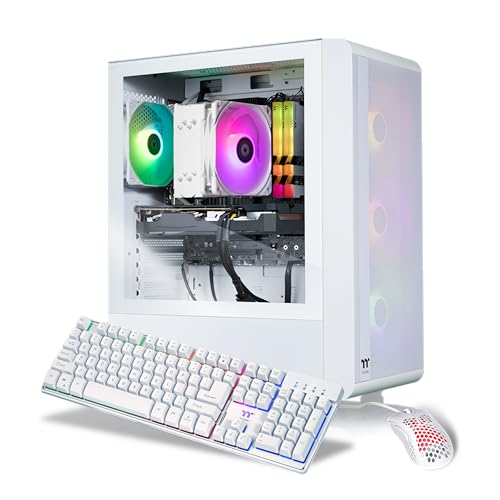
The Thermaltake Quartz R66 stands out with its strong component pairing and aesthetic appeal. At its heart is the AMD Ryzen 5 5600 CPU and the AMD Radeon RX 6600 GPU. This combination is particularly effective for 1080p gaming, often achieving high frame rates in demanding games. The 16GB of DDR4 memory running at 3600MHz is optimized for the Ryzen platform.
This system also features a large 1TB NVMe M.2 SSD for fast load times and RGB lighting on the memory for a customized look. Built by a reputable brand known for its cases and cooling solutions, the Quartz R66 offers a compelling package of performance, storage, and style for gamers who want a bit more visual flair.
Lenovo LOQ Gaming Laptop

For those who need portability without sacrificing power, the Lenovo LOQ gaming laptop is a standout choice. It is equipped with a very modern AMD Ryzen 7 8845HS processor and an NVIDIA GeForce RTX 4050 laptop GPU. This hardware allows it to compete with many desktop systems in this price range, providing excellent 1080p gaming performance on a 15.6-inch FHD display.
The combination of a high-performance CPU and a current-generation GPU makes this laptop exceptionally versatile. It is just as capable for work, content creation, and streaming as it is for gaming. If you value the ability to game in different locations or have limited space, the Lenovo LOQ offers a complete and powerful all-in-one solution.
Skytech Shiva Gaming PC Desktop
The Skytech Shiva represents a fantastic performance tier within this budget, pairing an AMD Ryzen 5 5600X CPU with an NVIDIA GeForce RTX 4060. The 5600X is a proven and capable processor for gaming, while the RTX 4060 is a major highlight. This graphics card supports DLSS 3 with Frame Generation, a technology that can dramatically improve performance in supported titles.
This combination positions the Shiva as a system that can not only max out settings for 1080p gaming but also confidently handle 1440p gaming. For gamers looking for the best possible graphics performance and future-proofing under $800, the Skytech Shiva, with its RTX 4060, is an incredibly strong contender that offers exceptional value.
HP Victus 15L Gaming Desktop
HP’s Victus 15L brings reliable brand engineering to the budget gaming space. It features an AMD Ryzen 5 5600G processor and an NVIDIA GeForce RTX 3050 graphics card. The compact and minimalist design of the Victus case will appeal to users who prefer a cleaner look for their desk setup without aggressive gaming aesthetics.
This desktop is built with the quality and support associated with the HP brand, offering peace of mind. The RTX 3050 provides a solid 1080p gaming experience, and the system is well-configured for everyday computing tasks as well. It’s a dependable and stylish option for someone who wants a trusted name in their gaming setup.
CYBERPOWERPC Gamer Xtreme VR Gaming PC
The CYBERPOWERPC Gamer Xtreme is configured for users who prioritize raw CPU power. It uses an Intel Core i5-14600KF processor, which offers high clock speeds and strong performance in both games and applications. This CPU is paired with an NVIDIA RTX 4060, mirroring the powerful GPU found in the Skytech Shiva.
This combination makes the Gamer Xtreme an excellent all-arounder. The high-performance Intel CPU is well-suited for tasks beyond gaming, such as streaming or content creation, while the RTX 4060 handles the graphics with ease. It’s a robust system for the price, offering a modern platform that can handle a wide variety of demanding uses.
Skytech Chronos Mini Gaming PC Desktop
The Skytech Chronos Mini offers a powerful component combination in a compact form factor. It features an Intel Core i5 13400F processor and, importantly, an NVIDIA RTX 4060 graphics card. The small footprint is ideal for desks with limited space or for users who prefer a less intrusive tower.
Do not let the size fool you; the performance is substantial. The i5-13400F is a capable and efficient CPU, and the RTX 4060 provides the same excellent 1080p and 1440p gaming performance with DLSS 3 support as it does in larger systems. The Chronos Mini is proof that you don’t need a massive tower to house a formidable gaming PC.
Buying Guide: How to Choose the Best Gaming PC Under $800 in 2025
Finding the right gaming PC under $800 is all about balancing performance with future-proofing. You want a machine that handles today’s games smoothly but won’t become obsolete tomorrow. The first component I always check is the graphics card (GPU). For solid 1080p gaming in 2025, you should be looking at cards like the NVIDIA GeForce RTX 4060 or the AMD Radeon RX 7600. These GPUs offer excellent performance for the price and include features like DLSS and FSR, which can significantly boost your frame rates in supported games without a visual quality drop.
Next up is the processor (CPU). You don’t need the absolute top-of-the-line chip, but a modern quad-core or, better yet, a six-core processor is the sweet spot. From Intel, aim for a Core i5 from the 13th, 14th, or 15th generation. From AMD, a Ryzen 5 7000 or 8000 series processor will do a fantastic job. These CPUs ensure your system won’t bottleneck your GPU and can handle game logic and background tasks with ease.
Memory, or RAM, is another critical factor. In 2025, 16GB of DDR5 RAM is the standard I consider the minimum for a new gaming PC. While some less demanding games might run on 8GB, many newer titles are starting to require more. Getting a system with 16GB means you’re set for the foreseeable future and can run Discord, a browser, and your game simultaneously without a hitch. Also, pay attention to storage. A 512GB NVMe SSD is a good starting point, but if you can find a configuration with a 1TB SSD, that’s even better. It will drastically reduce load times compared to a traditional hard drive.
Finally, think about the platform and upgradeability. Look for a PC that uses a current-generation motherboard socket (like AM5 for AMD or LGA 1700/1851 for Intel). This gives you a clear path for a future CPU upgrade without replacing the entire motherboard. Good airflow in the case and a reliable power supply unit (PSU) from a known brand are also important for long-term stability. By focusing on these key areas—a strong GPU, a capable CPU, sufficient RAM, fast storage, and a good platform—you can confidently pick one of the 8 best gaming PCs under $800 in 2025 that will be a reliable gaming partner for years to come.
Frequently Asked Questions
Can a gaming PC under $800 really handle new games in 2025?
Absolutely. While you won’t be maxing out the settings on every new AAA title at 4K resolution, a well-configured $800 PC in 2025 is perfectly positioned for excellent 1080p gaming. You can expect to play most new games at High settings and achieve smooth frame rates of 60 FPS or higher. Technologies like NVIDIA’s DLSS and AMD’s FSR are game-changers, using AI to upscale images and provide a big performance boost without a major loss in visual quality.
Is it better to build my own PC or buy a pre-built one at this price?
This is a classic question. Building your own PC can sometimes save you money and lets you hand-pick every single component. However, for a budget under $800, pre-built systems from reputable brands often offer incredible value. They benefit from bulk purchasing power for parts and come with a single warranty for the whole system, which saves you a lot of hassle. For most people, especially those new to PC gaming, a pre-built is a safe and reliable choice.
What kind of warranty should I expect with a gaming PC in this price range?
Most major manufacturers provide a standard one-year limited warranty on their pre-built gaming PCs. Some may offer extended warranty options for an additional cost. It’s always a good idea to check the specific warranty terms before you buy. A one-year warranty is typical and should cover any defects in parts or workmanship.
Will I need to buy anything else besides the PC itself?
Yes, you will need a few extras to complete your setup. The tower itself usually doesn’t include a monitor, keyboard, or mouse. You’ll need to budget for those separately. You’ll also need an operating system, but the good news is that many of the 8 best gaming PCs under $800 in 2025 come with Windows 11 pre-installed. Always double-check the product description to be sure.
How important is an SSD for gaming?
Extremely important. An SSD (Solid State Drive) is one of the most impactful upgrades for a gaming PC. It won’t increase your frame rate, but it will make your entire system feel much faster. Games will load in seconds instead of minutes, and level transitions will be almost instantaneous. In 2025, an NVMe SSD is the standard, and I would not recommend buying a gaming PC without one.
How long can I expect an $800 gaming PC to last before needing an upgrade?
With a smart purchase today, you can expect a solid 3-4 years of great 1080p gaming performance before you might feel the need to start lowering settings for the most demanding new releases. The key to longevity is starting with a balanced system that has a modern platform, allowing for easier future upgrades like adding more RAM or swapping in a new GPU down the line.